whatsapp

B2B Marketing Agency for Leadership Training USA: The 2026 Lead Gen Playbook

author_9

Manjeet yadav

Author
category b2b performance marketing calendar February 19, 2026 clock 5 mins read

Table of content

What does a B2B marketing agency for leadership training do?

A B2B marketing agency for leadership training helps US-based course creators and coaching firms drive corporate enrollments by targeting enterprise decision-makers who are either seeking growth as a leader or first time leaders. Instead of focusing on vanity metrics, a specialized agency builds omnichannel media plans across LinkedIn, Google, Meta, and Native platforms to generate high-intent Sales Qualified Leads (SQLs), actively collaborating with the client’s sales team to ensure pipeline quality and maximize ROI.

coaching business lead generation in us

The Fatal Flaw in High-Ticket Course Marketing

If you are selling a $1000 to $5000 corporate leadership training program in the US, standard B2C marketing tactics will make your budgets exhaust faster.

Most agencies treat course enrollment like an e-commerce transaction. They chase cheap clicks, make you feel happy with low Cost-Per-Lead (CPL), and flood you with so many leads who have zero purchasing power. When your sales team calls these leads, they get ghosted.

Selling premium leadership development to US enterprises requires a shift in strategy. You don’t need more leads; you need the right leads. You need a B2B performance marketing agency that understands the complex buying cycle of corporate America—from HR Directors to Chief Learning Officers and VP-level executives.

Why We Don’t Just Focus on Cost Per Lead 

At RSXigital, we have a hard rule when building media plans for US leadership courses: We optimize for Sales Qualified Leads (SQLs), not Marketing Qualified Leads (MQLs).

A lead is useless if it doesn’t show interest and affirms. This is the feedback loop that separates a vendor from a true growth partner:

  1. The Sales Persona Sync: Before a single dollar of ad spend is deployed, we sit down with your closers. We want to know exactly what objections they hear, what titles actually have the authority to sign the check, and what pain points trigger a “yes.”
  2. Quality Over Volume: We actively restrict our targeting to filter out unqualified traffic. We would rather deliver 20 highly qualified CLOs who are actively budgeting for Q3 training than 500 entry-level managers who just wanted a free PDF.
  3. The Closed-Won Feedback Loop: When your sales team closes a deal, that data is fed directly back into our ad platforms. We train the algorithms on the exact profile of the buyer who actually converted, continually refining the targeting to find more clones of your best customers.

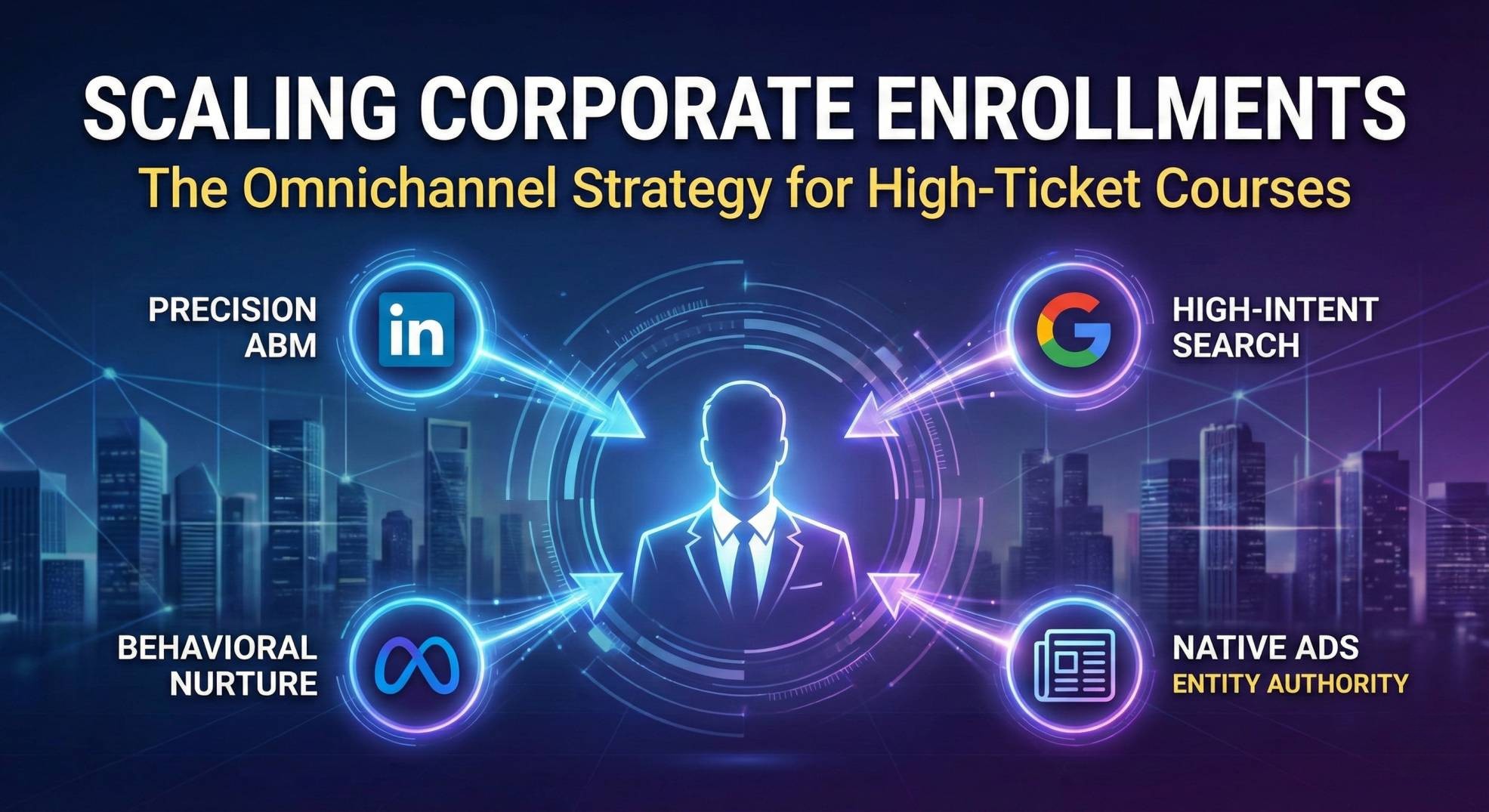
The Omnichannel B2B Media Plan: Reaching US Decision-Makers

rsxigital b2b performance marketing agency 1


Enterprise buyers don’t make $50,000 purchasing decisions based on a single ad. They require multiple touchpoints across different environments. To capture this demand, RSXigital builds a sophisticated, omnichannel media plan that surrounds the decision-maker.

1. LinkedIn Ads: The Precision Engine

LinkedIn is where we anchor the account-based marketing (ABM) strategy. This isn’t about broad targeting; it’s about surgical precision. We layer Job Title (e.g., Director of HR, VP of Talent Development) over Company Size (e.g., 500-5000 employees) and specific US regions. Here, we run high-value lead magnets, such as proprietary industry reports on leadership retention, to capture their contact information right where they do business.

2. Google Ads: Capturing High-Intent Search

While LinkedIn creates demand, Google Ads captures it. We bid aggressively on high-intent, Bottom-of-Funnel (BOFU) search terms. When an HR executive in New York actively searches for “corporate leadership training programs for mid-level managers,” your landing page needs to be the first thing they see. We structure campaigns around exact-match intent to ensure every click has a high probability of converting.

3. Meta Ads: The Behavioral Nurture

Corporate buyers still scroll Instagram and Facebook after work. We use Meta Ads not for cold outreach, but for aggressive, low-cost retargeting. Once a prospect visits your site or engages with a LinkedIn ad, we use Meta to stay top-of-mind, showcasing video testimonials, case studies, and instructor authority to build trust over the 30-to-90-day sales cycle.

4. Native Ads (Taboola & Outbrain): Building Entity Authority

To establish true industry dominance, we place your thought leadership content on premium publisher sites (like Forbes, Business Insider, or specialized HR journals) using platforms like Taboola and Outbrain. This positions your leadership program as a vetted, authoritative solution right as executives are reading industry news.

How to Generate Leads for Leadership Training

If you are currently attempting to generate corporate leads in-house, you are likely hitting a wall. The playbook for 2026 requires more than a landing page and a boosted post. If you want to scale internally, you must:

  • Map the Buying Committee: Understand that the person taking the course (the manager) is rarely the person buying the course (the HR Director). Your messaging must appeal to both.
  • Implement Lead Scoring: Use CRM automation to score leads based on their interactions. Only pass leads to your sales team once they have hit a specific threshold (e.g., watched a webinar and visited the pricing page).
  • Manage Ad Fatigue: B2B audiences are small. If you show the same ad to a 1,000-person audience for a month, your frequency rate will skyrocket, and your conversions will plummet. You must refresh creative constantly.

Managing this infrastructure requires a full-time media buyer, a copywriter, and a CRM architect. This is why high-growth training companies eventually outsource to a specialized agency.

The RSXigital Leadership Enrollment Matrix

When you partner with RSXigital, we deploy our proprietary Leadership Enrollment Matrix. This framework ensures your marketing dollars translate directly into pipeline revenue:

  1. Strategic Audience Interception: We identify the exact digital footprint of your ideal US corporate buyer and build the omnichannel media plan to intercept them.
  2. Sales-Aligned Qualification: We build friction into the funnel intentionally—using customized lead forms that filter out bad fits so your sales team only speaks to buyers with budget and authority.
  3. Closed-Loop Automation: We build the backend tracking that connects our ad platforms directly to your closed-won data, allowing us to scale the campaigns that actually generate revenue, not just clicks.

Ready to Scale Your Corporate Enrollments?

Stop fighting the algorithms on your own and stop settling for agencies that celebrate cheap, unqualified leads. Partner with a B2B performance marketing agency that speaks the language of enterprise sales. RSXigital provides the strategic media planning, the omnichannel execution, and the exact sales alignment you need to dominate the US leadership training market.

If you're interested in improving your digital marketing

call icon big

Give us a call on

or
mail icon big

Write an email to

author_9
Manjeet yadav

Author

Digital Marketing Trends 2026: A Strategist’s Guide to Growth

author_9

Manjeet yadav

Author
category Digital Marketing calendar January 15, 2026 clock 5 mins read

Table of content


Digital Marketing is Evolving. Is Your 2026 Strategy Ready?

The speed of digital change isn’t slowing down; it’s compounding. As we step into 2026, “adapting” isn’t enough—businesses need to anticipate. The playbook that worked two years ago is now the baseline. In this guide, we’re cutting through the noise to look at the trends that will actually move the needle for your growth this year.

10 Digital Marketing Trends Defining 2026

Here is where the industry is going and where you should be looking:

  1. AI Moves from Creation to Execution (Agentic AI)
  2. Search Evolves Beyond Keywords (SGE & LLMs)
  3. Short-Form Video Becomes “Shoppable”
  4. Zero-Party Data replaces Third-Party reliance
  5. Influencer Marketing shifts to Long-Term Ambassadors
  6. Immersive Commerce & Spatial Web
  7. Radical Transparency & Ethical Consumerism
  8. Predictive Personalization in Messaging
  9. Gamification & Interactive Experiences
  10. Unified Commerce (The True Omnichannel)

1. AI Moves from Creation to Execution

In 2025, we used AI to write copy. In 2026, AI is beginning to do the work. We are seeing the rise of “Agentic AI”—autonomous agents that don’t just analyze data but execute tasks, optimize ad spend in real-time without human intervention, and manage complex customer service flows.

The Strategist’s Move:

  • Stop using AI just for content; start using it for operations and workflow automation.
  • Implement autonomous agents for 24/7 customer resolution, not just “chat.”
  • Use predictive AI to forecast trends before they happen.

2. Search Evolves Beyond Keywords

“Voice Search” has graduated. We are now in the era of Generative Search (like Google’s AI Overviews and ChatGPT Search). Users aren’t just typing keywords; they are having conversations with search engines. Ranking #1 matters less than being the cited answer in an AI response.

The Strategist’s Move:

  • Optimize for “Answer Engine Optimization” (AEO), not just SEO.
  • Structure your content to answer specific, complex questions directly.
  • Focus on conversational, natural language on your site.

3. Short-Form Video Becomes “Shoppable”

Video is still king, but the metric has changed. It’s no longer just about “views”; it’s about “action.” Platforms like TikTok and Reels are becoming search engines and checkout counters rolled into one. The trend for 2026 is seamless purchasing directly within the video feed.

The Strategist’s Move:

  • Integrate product tags and direct checkout links in your videos.
  • Create “Edutainment” content—educate the user, then offer the solution immediately.
  • Focus on the first 3 seconds; retention is the only metric that matters.

4. Zero-Party Data is the New Gold

First-party data (what you track) is good; Zero-party data (what customers tell you) is better. With privacy laws tightening, the smartest brands are simply asking customers what they want. This builds trust and accuracy that cookies never could.

The Strategist’s Move:

  • Create interactive quizzes or preference centers where users willingly share interests.
  • Offer genuine value (discounts, exclusive content) in exchange for data.
  • Treat this data with extreme care to build long-term trust.

5. Influencer Marketing: From “Posts” to “Partnerships”

The days of paying a stranger for a single shout-out are fading. 2026 is about “Creator Partnerships.” Brands are integrating creators into their product development and long-term strategy. It’s about deep alignment, not just reach.

The Strategist’s Move:

  • Build 6-12 month contracts with ambassadors rather than one-off posts.
  • Co-create products or content series with influencers.
  • Look for “Nano-influencers” with hyper-loyal communities rather than just high follower counts.

6. Immersive Commerce (Spatial Web)

With hardware like VR headsets and AR glasses becoming more common, “flat” e-commerce is getting an upgrade. 2026 sees more brands offering “Try before you buy” via AR, visualizing furniture in a room, or makeup on a face, directly from the browser.

The Strategist’s Move:

  • Upload 3D models of your products to your store.
  • Use AR filters for “virtual try-ons” on social platforms.
  • Reduce return rates by giving customers a better visual reality before purchase.

7. Radical Transparency & Sustainability

Consumers in 2026 can smell “greenwashing” from a mile away. It’s not enough to say you are eco-friendly; you have to prove it. Marketing is shifting towards raw transparency regarding supply chains, ethical labor, and corporate governance.

The Strategist’s Move:

  • Show, don’t just tell. Use behind-the-scenes content to show your process.
  • Be honest about where you aren’t perfect yet; vulnerability builds trust.
  • Align your brand with causes that actually make sense for your industry.

8. Predictive Personalization in Messaging

We are moving past “Hi [Name].” The new standard is hyper-relevant messaging based on predicted behavior. AI analyzes past actions to predict what a customer needs next, sending an email or SMS before the customer even realizes they need it.

The Strategist’s Move:

  • Segment your audience based on behavior, not just demographics.
  • Trigger flows based on inactivity or predicted churn.
  • Make every message value-heavy; if it’s generic, don’t send it.

9. Gamification & Interactive Experiences

Passive consumption is boring. To hold attention in 2026, you need to invite participation. Polls, quizzes, challenges, and leaderboards turn marketing into a two-way conversation.

The Strategist’s Move:

  • Add simple gamification elements to your loyalty programs.
  • Run “Challenges” on social media that require user participation.
  • Use interactive calculators or tools on your website to increase time-on-page.

10. Unified Commerce (The True Omnichannel)

The customer doesn’t see “channels”; they just see your brand. Whether they are on Instagram, your app, or in a physical store, the experience (and the cart) needs to be one single ecosystem. 2026 is about removing the friction between these touchpoints.

The Strategist’s Move:

  • Ensure your CRM connects every single touchpoint.
  • Allow “Buy Online, Pick Up In-Store” (BOPIS) if you have a physical presence.
  • Maintain a unified tone of voice everywhere.

Final Thoughts

The digital marketing trends of 2026 are less about “hacks” and more about integration. It’s about using AI to be more human, using data to be more helpful, and using video to be more authentic. The brands that win this year won’t just be the loudest; they will be the most relevant.

Ready to lead your market in 2026?

You don’t have to figure this out alone. At RSXigital, we don’t just follow trends; we build strategies around them. Let’s future-proof your business.

Partner with RSXigital


Frequently Asked Questions (FAQs)

1. What is the biggest change in digital marketing for 2026?
The shift to Agentic AI and Generative Search. It’s no longer just about keywords or simple automation; it’s about AI tools that can execute complex tasks and search engines that provide direct answers rather than just links.

2. Is SEO still relevant in 2026?
Yes, but it has changed. It is now about Answer Engine Optimization (AEO). You need to optimize your content so that AI models (like ChatGPT or Google Gemini) cite you as the authority when answering user questions.

3. Why is Zero-Party data important now?
With third-party cookies effectively dead and privacy laws stricter, you cannot rely on “following” users around the web. Zero-party data (data users willingly give you) is the only safe, accurate way to personalize marketing.

4. How has influencer marketing changed?
It has moved away from “pay-per-post” to long-term ambassadorships. Audiences trust creators who use a product consistently over time, rather than one-off endorsements.

5. What is “Unified Commerce”?
It is the evolution of omnichannel. It means your customer’s cart, history, and profile are instantly accessible whether they are shopping on TikTok, your website, or in a physical store—zero friction, total continuity.


If you're interested in improving your digital marketing

call icon big

Give us a call on

or
mail icon big

Write an email to

author_9
Manjeet yadav

Author

How to Start Digital Marketing: A Guide for 2025

author_9

Manjeet yadav

Author
category Digital Marketing calendar March 27, 2025 clock 13 mins read

Table of content

Are you ready to step into one of the most in-demand industries of 2025? Whether you’re a student, professional, freelancer, or entrepreneur, this guide will help you understand how to get started in digital marketing and grow your skills or business.

At RSXigital, we empower individuals and businesses to master digital marketing with clarity and confidence.

What Is Digital Marketing?

Digital marketing refers to using digital channels like search engines, websites, social media, email, and mobile apps to promote products or services. It’s all about reaching your audience online and converting them into customers.

This includes:

  • Search Engine Optimization (SEO)
  • Search Engine Marketing (Google Ads, Bing Ads)
  • Social Media Marketing (Facebook, Instagram, LinkedIn)
  • Content Marketing (Blogs, Videos, Infographics)
  • Email Marketing
  • Affiliate & Influencer Marketing
  • Web Analytics and Conversion Optimization

Digital Marketing Approaches in the Buyer’s Journey

A buyer doesn’t usually make a purchase instantly. They move through different stages—from discovering a need to becoming a loyal advocate. In 2025, successful digital marketing strategies align with each of these stages to guide users smoothly through the funnel.

Here’s a deep dive into each phase:

1. Awareness Stage

Goal: Help people realize they have a problem or need.

In this first stage, your audience may not know about your brand—or even that they need your product or service. The goal here is to attract attention and build brand visibility.

Digital Marketing Tactics:

  • Paid Ads (Google Ads, Meta Ads): Target specific keywords or interests to introduce your brand.
  • Social Media Content: Share engaging, entertaining, or educational posts that connect with your target audience.
  • SEO & Blogging: Create valuable content that answers questions or solves problems people are searching for.
  • Video Marketing: Use platforms like YouTube or TikTok to explain concepts or show product use cases.
  • Influencer Collaborations: Leverage trusted voices to introduce your brand organically.

Example:
Someone searching “how to reduce stress” lands on your blog post about mindfulness techniques—you’ve entered their awareness.

2. Consideration Stage

Goal: Help the buyer evaluate different solutions.

Now that the buyer is aware of their problem and some possible solutions, they start comparing options. This is the time to build trust and educate.

Digital Marketing Tactics:

  • Email Marketing: Share informative content or resources after they subscribe.
  • Retargeting Ads: Remind users who visited your website but didn’t convert.
  • Comparison Guides: Help prospects compare your services/products with alternatives.
  • Webinars or Live Demos: Offer in-depth, interactive experiences to answer questions and highlight features.
  • Lead Magnets: Free downloads like eBooks or checklists in exchange for emails build your list and add value.

Example:
After reading your blog, the same user downloads your free eBook: “10 Natural Stress-Relief Methods.” You send follow-up emails explaining how your mindfulness app works.

3. Decision Stage

Goal: Convince the buyer to choose your solution.

Here, the buyer is ready to purchase but is choosing between a few options. This is your moment to showcase proof and benefits that help them take action.

Digital Marketing Tactics:

  • Customer Reviews & Testimonials: Build credibility through real user feedback.
  • Case Studies: Show detailed success stories or results achieved by past clients.
  • Limited-Time Offers: Use urgency to encourage fast decisions.
  • Free Trials or Consultations: Lower the barrier to entry.
  • Personalized Messaging: Use dynamic emails or website content tailored to their interests or behavior.

Example:
Your automated email sends a testimonial from someone with a similar profile and offers a 7-day free trial of your app—making it easier for them to choose you.

4. Loyalty Stage

Goal: Keep the customer happy and engaged.

Getting a customer is just the beginning. Now it’s time to build loyalty so they stay, upgrade, and keep choosing your brand.

Digital Marketing Tactics:

  • Email Newsletters: Keep users informed about updates, tips, and exclusive content.
  • Loyalty Programs: Offer rewards for repeat purchases or referrals.
  • Personalized Offers: Use purchase data to recommend relevant products/services.
  • SMS Campaigns: Deliver quick updates or special discounts.
  • Community Building: Invite customers to private groups or communities for deeper engagement.

Example:
After using your app for 30 days, the user gets a discount on their first paid subscription and is invited to a mindfulness Facebook group you manage.

5. Advocacy Stage

Goal: Turn customers into brand promoters.

When people love your product, they’ll recommend it. The goal here is to give them tools and motivation to spread the word.

Digital Marketing Tactics:

  • Referral Programs: Reward users for bringing in new customers.
  • User-Generated Content (UGC): Encourage customers to share reviews, testimonials, or photos.
  • Social Media Contests: Create viral campaigns that involve sharing.
  • Loyalty Tiers or Ambassador Programs: Recognize and reward your most active fans.
  • Review Requests: Ask for reviews on Google, Trustpilot, or your website.

Example:
Your app offers users a 30% discount if they refer a friend—and features them in a “mindfulness success story” series on Instagram.

Summary

Here’s how digital marketing connects with the buyer’s journey:

Stage Objective Marketing Strategy
Awareness Attract attention SEO, Ads, Social Content
Consideration Build trust Retargeting, Emails, Webinars
Decision Convert Reviews, Offers, Free Trials
Loyalty Retain Newsletters, Personalization, Rewards
Advocacy Promote Referrals, UGC, Reviews


Each step is an opportunity to guide, support, and convert prospects into loyal customers—and eventually, brand advocates.

Benefits of Digital Marketing

In 2025, digital marketing remains one of the most powerful tools for businesses, entrepreneurs, and freelancers alike. Whether you’re just getting started in digital marketing or looking to grow your brand, here are the top advantages:

1. Cost-Effective Marketing

Compared to traditional methods like TV or print, digital marketing is far more affordable. You can start with a small budget and scale based on performance—making it perfect for startups and small businesses.

2. Measurable Results

With tools like Google Analytics, Meta Ads Manager, and email platforms, you can track everything:

  • Website traffic
  • Conversion rates
  • Ad performance
  • Customer behavior

This allows you to make data-driven decisions and maximize ROI.

3. Global Reach

The internet has no borders. Digital marketing helps you connect with audiences from different countries and cultures. Whether you’re targeting a local region or going international, your reach is unlimited.

4. Targeted Campaigns

Unlike offline ads, digital platforms let you target by location, age, gender, interests, behavior, and more. This increases the relevance of your campaigns and improves results.

5. Improved Customer Engagement

Through social media, live chat, and email, you can engage with your audience in real-time. Responding quickly and offering value builds trust and boosts brand loyalty.

6. Faster Conversions

Digital marketing offers tools like landing pages, remarketing ads, and sales funnels that guide users to convert faster—whether it’s making a purchase, booking a service, or signing up.

7. High ROI (Return on Investment)

With smart targeting and performance tracking, digital marketing can deliver higher returns at lower costs. Even small investments in email marketing or SEO can generate consistent leads over time.

8. Personalization

You can personalize emails, offers, and website experiences based on user behavior. This level of customization boosts engagement and drives better outcomes.

9. Level Playing Field

Digital marketing gives small businesses the opportunity to compete with larger ones. With the right strategy, even a startup can outperform a big brand online.

10. Real-Time Optimization

Unlike traditional campaigns that are fixed once launched, digital campaigns can be edited, paused, or scaled in real-time. This flexibility helps you adapt quickly and avoid wasting budget.

11. Supports Multiple Business Goals

Whether you’re trying to:

  • Build brand awareness
  • Generate leads
  • Increase sales
  • Grow a community
  • Educate your audience

Digital marketing offers tools for every goal.

12. Sustainability & Longevity

Efforts like SEO and content marketing have long-term benefits. A blog post or YouTube video can continue to bring traffic and leads months—or even years—after it’s published.

Digital Marketing vs. Offline Marketing

While digital marketing leverages online platforms to engage audiences, offline (or traditional) marketing relies on physical and broadcast channels such as print ads, billboards, and TV commercials. Both approaches aim to promote products or services, but they differ in execution, reach, and measurability. Here’s a closer look at how digital and offline marketing stack up against each other:

Digital Marketing

Digital marketing is the practice of promoting products or services using digital platforms like websites, social media, search engines, email, and mobile apps. It helps businesses connect with their audience online—where most people spend their time. From running Google Ads to sharing content on Instagram or sending personalized emails, digital marketing offers targeted, measurable, and cost-effective ways to attract, engage, and convert potential customers.

Offline Marketing

Offline marketing refers to traditional promotional methods that operate outside of the digital space. It includes channels like print ads, billboards, TV and radio commercials, direct mail, and in-person events. These strategies are ideal for building local awareness and reaching audiences who may not be active online. While offline marketing offers broad exposure, it lacks the precise targeting and real-time tracking that digital marketing provides in today’s connected world.

Digital Marketing Offline Marketing
Cost-effective Expensive
Global reach Local or regional
Real-time analytics Limited tracking
Two-way communication One-way communication
Instant optimization Fixed once published

Digital marketing offers better flexibility, targeting, and performance tracking—making it the preferred choice in 2025.

8 Steps to Start in Digital Marketing in 2025

At RSXigital, we understand that stepping into digital marketing can feel overwhelming. That’s why we’ve broken it down into 8 practical, easy-to-follow steps to help you build a strong foundation and launch your digital marketing journey confidently.

Step 1: Understand the Digital Marketing Landscape

Before launching campaigns or managing social platforms, it’s vital to grasp the core components of digital marketing and why it’s crucial for businesses today.

Digital marketing uses online platforms to connect with customers, build relationships, and drive conversions. Key strategies include:

  • SEO – Boost your website’s visibility in search engines.
  • PPC (Pay-Per-Click) – Paid ads on Google or social media that charge per click.
  • Email Marketing – Personalized communication directly to users’ inboxes.
  • Social Media Marketing – Build brand presence and connect with audiences on platforms like Instagram, TikTok, Facebook, and LinkedIn.
  • Content Marketing – Create valuable assets like blogs, videos, and infographics to attract and engage.

Unlike traditional marketing, digital allows for real-time tracking, targeted messaging, and precise performance measurement. You know exactly what works—and can adjust fast.

Step 2: Choose the Right Digital Marketing Channels

Not all marketing platforms serve the same purpose. Choose your channels based on your goals and where your audience spends time.

Popular Digital Marketing Channels:

  • Social Media – Ideal for engagement and brand building.
    LinkedIn for B2B, TikTok for Gen Z, Instagram for lifestyle brands.
  • Content Marketing – Blogs, podcasts, and webinars improve SEO and educate your audience.
  • PPC Advertising – Get quick visibility through Google Ads or social media campaigns.
  • Email Marketing – Nurture leads with personalized campaigns that build loyalty.

Pro Tip: Use tools like Google Analytics, Meta Insights, or SEMrush to analyze what channels perform best for your brand or clients.

Step 3: Learn Core Digital Marketing Skills

Success in digital marketing requires both creative and technical skills. Here are essential ones to master:

  • SEO – Learn keyword research, on-page SEO, and backlink building.
  • Copywriting – Craft messages that persuade, convert, and connect.
  • Graphic Design – Use tools like Canva to create engaging visuals.
  • Social Media Management – Plan, schedule, and analyze content across platforms.
  • Email Campaigns – Master platforms like Mailchimp to send impactful, personalized emails.

These skills empower you to execute full campaigns—from ideation to analytics.

Step 4: Earn Digital Marketing Certifications

Certifications are a great way to build credibility, enhance your knowledge, and stand out in a competitive field.

Recommended Certifications:

  • Google Analytics & Google Ads – Understand performance data and PPC advertising.
  • HubSpot Content Marketing – Learn how to attract, convert, and retain users with content.
  • Meta Blueprint – Master Facebook and Instagram Ads.
  • SEMrush Academy – Deep dive into SEO and keyword strategy.
  • LinkedIn Learning & Coursera – Explore advanced marketing topics at your own pace.

Certifications show that you’re not only passionate but also up to date with current tools and strategies.

Step 5: Launch Your First Digital Marketing Campaign

Now that you’ve built a foundation, it’s time to apply your skills. Follow these steps to launch a successful campaign:

  1. Define Goals – Are you driving traffic, leads, or sales?
  2. Identify Your Target Audience – Use demographics, behaviors, and interests to refine targeting.
  3. Pick the Right Platform – Match the platform to your audience and goal.
  4. Create Content – Design high-quality visuals, compelling copy, and engaging CTAs.
  5. Launch & Track – Use real-time tools like Google Analytics or Meta Ads Manager to monitor performance.

Example: Want to generate leads? Run a targeted Facebook lead ad with a strong offer, then follow up through email.

Step 6: Use Digital Marketing Tools to Work Smarter

Digital marketing is easier and more efficient with the right tools. Here are some essentials:

Category Tools
Analytics Google Analytics, Hotjar
SEO SEMrush, Ahrefs, Ubersuggest
Email Mailchimp, Brevo (Sendinblue), ConvertKit
Design Canva, Adobe Express
Social media Buffer, Hootsuite, Later
Automation Zapier, Make (Integromat)

These tools help you streamline campaigns, track performance, and optimize efforts for better ROI.

Step 7: Stay Ahead with Marketing Trends

Digital marketing evolves fast. Staying informed keeps you competitive.

2025 Trends to Watch:

  • Influencer Marketing – Especially on TikTok and Instagram for product discovery.
  • AI-Powered Tools – Automate customer service, content creation, and data analysis.
  • Short-Form Video – Reels, YouTube Shorts, and TikTok videos dominate engagement.
  • Voice Search & Chatbots – Optimize for voice queries and real-time responses.

Subscribe to newsletters, join webinars, and follow experts to stay in the loop.

Step 8: Measure and Optimize Your Efforts

One of the biggest advantages of digital marketing is the ability to track and refine everything. Monitor these key metrics:

  • Conversion Rate – Are users taking the desired action?
  • Traffic Source – Where are your visitors coming from?
  • Engagement Rate – Are people interacting with your content?
  • Cost Per Lead/Acquisition – Are your campaigns delivering value?

Use these insights to test, learn, and improve. Small tweaks can lead to big performance gains.

Dive into Digital Marketing in 2025

2025 is the perfect time to enter this fast-growing industry. Digital channels are expanding, and businesses of all sizes need skilled marketers to:

  • Build brand presence
  • Drive traffic and sales
  • Improve customer engagement
  • Analyze and optimize campaigns

The barrier to entry is low, and the demand is high. You can become a digital marketer with the right mindset and resources.

What Types of Digital Marketing Agencies Exist?

Digital marketing agencies come in various formats:

  1. Full-Service Agencies – Handle everything from SEO to paid ads and email.
  2. Specialized Agencies – Focus on one niche like SEO or social media.
  3. Freelancer Collectives – Small teams offering flexible services.
  4. Performance Marketing Agencies – Pay-for-results or leads generated.
  5. In-House Teams – Agencies embedded within a company.

Each has different pricing models, goals, and client types.

What Services Does a Digital Marketing Business Provide?

A digital marketing company typically offers:

  • SEO (on-page, off-page, technical)
  • Pay-Per-Click (PPC) Advertising
  • Content Strategy & Blogging
  • Social Media Management
  • Email Marketing
  • Conversion Rate Optimization (CRO)
  • Analytics & Reporting
  • Branding & Online Reputation
  • Web Design & Development
  • Influencer & Affiliate Marketing

At RSXigital, we tailor these services to client goals and market trends.

Making Your Digital Marketing Company Stand Out

To grow a digital marketing business in 2025:

  • Focus on ROI – Show measurable results to clients.
  • Offer Custom Solutions – Avoid one-size-fits-all packages.
  • Embrace Automation – Use AI and marketing tools for scale.
  • Be Transparent – Clear reporting builds trust.
  • Deliver Fast & Stay Agile – Be quick to adapt and implement changes.
  • Stay Niche-Focused – Specializing in an industry (e.g., real estate, health, education) gives you a competitive edge.

Tools You Need to Run a Digital Marketing Company

Here’s your digital marketing toolbox:

  • SEO: SEMrush, Ahrefs, Google Search Console
  • PPC: Google Ads, Microsoft Ads, Meta Ads Manager
  • Design: Canva, Figma
  • Email: Mailchimp, ActiveCampaign
  • CRM: HubSpot, Zoho
  • Social Media: Buffer, Hootsuite, Later
  • Analytics: Google Analytics 4, Hotjar
  • Automation: Zapier, Make (Integromat)
  • AI: ChatGPT, Jasper, Grammarly

Learn from the Top Digital Marketing Agencies

Look at what successful agencies are doing:

  • Neil Patel Digital – Strong content + SEO + branding
  • WebFX – Focus on data and ROI
  • Disruptive Advertising – Excellent PPC and CRO strategies
  • SociallyIn – Creative social campaigns
  • RSXigital – Performance-driven solutions tailored for business growth

Study their websites, blog strategies, and social media presence. See how they present their value and differentiate themselves.

Final Thoughts

Starting digital marketing in 2025 isn’t just about gaining skills—it’s about building a career or business that adapts with the times. With AI tools, evolving platforms, and growing demand, there’s no better time to start.

RSXigital is here to guide you on that journey—whether you’re looking to become a digital marketer, hire an expert team, or scale your marketing agency.

FAQs

Q1: How long does it take to become a digital marketer?

A: You can learn the basics in 3-6 months, and become job-ready with consistent practice in 6-12 months.

Q2: Do I need a degree to start digital marketing?

A: No, most employers value skills and portfolios over degrees.

Q3: What tools should I learn?

A: Google Analytics, Meta Ads Manager, Google Ads, Canva, SEMrush, ChatGPT, Mailchimp, and WordPress are great starting points.

If you're interested in improving your digital marketing

call icon big

Give us a call on

or
mail icon big

Write an email to

author_9
Manjeet yadav

Author

What is Lead Generation in Digital Marketing?

author_4

RSXigital

Author
category Digital Marketing calendar March 24, 2025 clock 8 mins read

Table of content

In today’s online world, businesses can’t rely on walk-ins or cold calls. Instead, success depends on attracting the right people and converting them into customers. That’s where lead generation in digital marketing comes in.

It’s the process of finding and capturing the interest of potential customers online—before they even speak to a salesperson. At RSXigital, we help businesses use digital channels to create smart, effective strategies for generating high-quality leads.

What is a Lead in Digital Marketing?

A lead in digital marketing is someone who has shown interest in your business—by visiting your website, downloading a free guide, filling out a form, or subscribing to your newsletter.

There are different types of leads:

  • Cold leads: Visitors who show initial interest
  • Marketing Qualified Leads (MQLs): Engaged users who are not ready to buy yet
  • Sales Qualified Leads (SQLs): People who are ready to speak to your sales team

The goal of digital lead generation is to attract all of these potential customers and guide them through your sales funnel.

How to Generate Marketing Leads?

Generating marketing leads means capturing the attention of people who are likely to become your customers. Here are proven ways to do it effectively:

1. Create High-Value Content

Write helpful blog posts, guides, and tutorials that answer your audience’s questions. Valuable content attracts organic traffic and builds trust, making it easier to collect leads.

2. Use Lead Magnets

Offer something in exchange for contact information—like a free eBook, checklist, consultation, or discount. Make sure it’s relevant and valuable to your target audience.

3. Build Optimized Landing Pages

A landing page should have a single goal: convert visitors into leads. Keep the design clean, use a clear call-to-action (CTA), and highlight the benefits of your offer.

4. Run Paid Ads

Google Ads and social media campaigns can drive targeted traffic quickly. These channels are powerful tools for digital marketing agency lead generation, especially when optimized properly.

5. Use Pop-Ups and Exit Intent Offers

Strategic pop-ups can increase conversions by offering lead magnets right before a visitor leaves your site.

6. Leverage Social Proof

Include testimonials, case studies, or client success stories on your pages. This builds credibility and improves lead conversion rates.

7. Engage on Social Media

Answer questions, run polls, and host live sessions on platforms like LinkedIn, Facebook, and Instagram. These interactions can warm up potential leads and push them to take action.

8. Use Email Capture Forms Strategically

Place forms in high-visibility spots—like blog sidebars, headers, and footers. Keep the form short and easy to fill out.

Why Lead Generation Matters in Digital Marketing

If you want more sales, you need more leads. But not just any leads—the right ones.

Here’s why lead generation in digital marketing is critical:

  • Builds a predictable sales pipeline
  • Increases conversion rates
  • Improves marketing ROI
  • Reduces customer acquisition costs
  • Grows your brand visibility and trust

A smart digital marketing agency lead generation strategy helps you reach people who are already looking for your products or services.

How Digital Lead Generation Works

Here’s how businesses generate leads online step by step:

  1. Attract traffic: Use SEO, Google Ads, social media, or content to bring people to your site.
  2. Offer value: Create a lead magnet—a free resource like an ebook, checklist, or demo.
  3. Capture info: Ask for the visitor’s email or phone number in exchange for the lead magnet.
  4. Follow up: Send emails or retarget them with ads to keep the conversation going.
  5. Convert: Use sales pages, calls, or offers to turn the lead into a customer.

At RSXigital, we help businesses map this journey and build systems that attract and convert high-intent leads every day.

Best Channels for Lead Generation in Digital Marketing

To succeed with digital lead generation, you need to pick the right platforms. Here are the most powerful ones:

1. Search Engine Optimization (SEO)

High-ranking websites get more traffic. At RSXigital, we optimize your website and blog content to bring in leads organically from Google.

2. Pay-Per-Click Advertising (PPC)

PPC ads on Google, Facebook, or LinkedIn let you reach people based on interests, behaviors, and location. This is one of the fastest ways to grow leads in digital marketing campaigns.

3. Social Media Marketing

Social media is great for promoting offers, engaging with potential leads, and running low-cost ad campaigns. It’s ideal for digital marketing agency lead generation.

4. Landing Pages and Lead Magnets

Dedicated landing pages help you focus the visitor’s attention and improve conversions. A great lead magnet (like a free consultation or downloadable guide) is essential.

5. Email Marketing Automation

Once you capture a lead, use emails to build trust, answer objections, and offer help. Marketing automation makes it easy to manage this process at scale.

Tools to Boost Lead Generation in Digital Marketing

To succeed in digital lead generation, you need the right tools to capture, track, nurture, and convert leads efficiently. These tools help automate your processes, understand your audience better, and improve decision-making.

Here are some of the most powerful tools to enhance your lead generation in digital marketing:

1. HubSpot / Zoho CRM – Lead Management and Nurturing

HubSpot and Zoho CRM are two of the most popular Customer Relationship Management (CRM) platforms. They help you organize your leads, track interactions, and move them through the sales funnel smoothly.

What they do:

  • Store and manage lead information
  • Track customer interactions via email, calls, and forms
  • Automate lead nurturing with workflows
  • Assign leads to sales reps based on behavior

These tools are essential for digital marketing agency lead generation because they provide a complete view of your leads and help streamline communication.

2. Google Analytics – Understand Lead Sources

Google Analytics gives you detailed insights into where your leads are coming from—organic search, social media, paid ads, email, or direct traffic.

How it helps:

  • Tracks website traffic and user behavior
  • Shows which channels generate the most conversions
  • Helps optimize marketing spend and ROI
  • Identifies top-performing pages and content

By understanding which sources drive the most leads in digital marketing, you can focus your efforts on the most effective channels.

3. Mailchimp / ActiveCampaign – Email Marketing Automation

Email marketing is a powerful tool for following up with leads, nurturing relationships, and converting prospects. Mailchimp and ActiveCampaign help you automate this process with minimal effort.

Why they’re valuable:

  • Build email lists through forms and pop-ups
  • Send automated email sequences based on behavior
  • Segment your audience for personalized messaging
  • Track open rates, click-throughs, and conversions

They’re perfect for engaging leads who aren’t ready to buy yet, keeping your brand top-of-mind until they’re ready.

4. Hotjar / Smartlook – Behavior Analytics Tools

Understanding how users behave on your website can reveal what’s working—and what’s not. Tools like Hotjar and Smartlook show you how visitors interact with your site through visual tools.

What you can do:

  • View heatmaps of clicks, scrolls, and mouse movements
  • Record user sessions to see how people navigate your site
  • Identify where visitors drop off in your funnel
  • Improve landing pages for higher conversions

These insights help you optimize every page for better lead generation in digital marketing.

5. Leadfeeder / Salespanel – Identify Anonymous Visitors

Most website visitors don’t fill out a form right away. Tools like Leadfeeder and Salespanel help uncover who these visitors are, so you can follow up even before they convert.

Key benefits:

  • Identify companies visiting your website
  • Track user journeys and behavior
  • Score leads based on engagement
  • Integrate with your CRM for easy outreach

For digital marketing agency lead generation, these tools help agencies proactively connect with potential B2B clients by turning anonymous traffic into actionable leads.

Why These Tools Matter

These tools are essential because they allow you to:

  • Work smarter with automation
  • Target the right audience with precision
  • Understand what your leads want
  • Save time and improve conversion rates

At RSXigital, we combine these tools with a data-driven strategy to build powerful digital lead generation systems for our clients. Whether you’re a startup or an established brand, using the right tools can be the difference between missed opportunities and long-term growth.

Common Mistakes in Lead Generation

Avoid these mistakes if you want to succeed with lead generation in digital marketing:

  • Weak CTAs (Call-to-Actions)
  • Asking for too much info upfront
  • Not testing or optimizing landing pages
  • Ignoring mobile users
  • Delayed follow-ups with leads

How RSXigital Helps with Digital Lead Generation

At RSXigital, we specialize in building performance-driven lead generation campaigns. Whether you’re a startup, B2B company, or local business, we create custom plans for:

  • SEO and content marketing
  • High-converting Google Ads
  • Targeted social media campaigns
  • CRM setup and email automation

Our goal is to help you generate quality leads in digital marketing that actually convert into customers.

Final Thoughts

Lead generation in digital marketing is more than just getting traffic—it’s about attracting the right people and guiding them toward action.

With a strong strategy and the right tools, you can build a steady stream of leads, grow your sales, and scale your business faster. Whether you’re doing it in-house or working with a trusted partner like RSXigital, success starts with putting your audience first.

Need help generating consistent leads online? Contact RSXigital today—we’ll help you turn clicks into customers.

Frequently Asked Questions (FAQs)

1. What is lead generation in digital marketing?

Lead generation in digital marketing is the process of attracting potential customers online and collecting their information (like email or phone number) so you can follow up with them. It involves strategies like SEO, content marketing, paid ads, and landing pages to capture user interest and drive conversions.

2. What are the best strategies for digital lead generation?

The best digital lead generation strategies include creating high-value content, running targeted ads, optimizing landing pages, using lead magnets, and nurturing leads through email marketing. Using analytics and automation tools also improves efficiency and results.

3. How do digital marketing agencies generate leads for clients?

A digital marketing agency lead generation approach involves using a mix of SEO, Google Ads, social media campaigns, email marketing, and CRM automation. Agencies analyze target audiences, create engaging campaigns, and optimize funnels to deliver qualified leads to businesses.

4. What’s the difference between a lead and a conversion?

A lead is someone who shows interest in your business by taking an action like filling out a form or subscribing. A conversion happens when that lead completes a desired goal—like making a purchase, booking a consultation, or signing a contract.

5. Why is lead generation important for small and mid-sized businesses?

For small and mid-sized businesses, lead generation in digital marketing helps build brand awareness, attract new customers, and compete with larger companies. It creates a predictable stream of potential clients, making growth more consistent and measurable.

If you're interested in improving your digital marketing

call icon big

Give us a call on

or
mail icon big

Write an email to

author_4
RSXigital

Author

Lorem ipsum dolor sit amet, consectetur adipisicing elit, sed do eiusmod tempor incididunt ut labore et dolore magna aliqua. Ut enim ad minim veniam, quis nostrud exercitation ullamco laboris nisi ut aliquip ex ea commodo consequat.

Local SEO for Small Business in 2025: A Complete Guide

author_4

RSXigital

Author
category SEO calendar March 20, 2025 clock 6 mins read

Table of content

If you own a small business, getting found online by people in your area is a big deal. Whether you’re an SEO freelancer in Dubai, a digital marketing agency in the USA, or a PPC specialist in UAE—local SEO for small business is one of the most powerful tools to grow your customer base and boost sales.

In this guide, RSXigital, a trusted digital marketing agency, walks you through everything you need to know about local SEO, including how it works, why it matters, and step-by-step tactics to help your business stand out in your local area.

Who We Are: RSXigital – Your Digital Growth Partner

RSXigital is a results-driven digital marketing agency that specializes in helping businesses scale online. From local SEO and Google Ads to content strategy and paid media, we provide complete digital solutions that build visibility, generate leads, and drive sales.

We understand the unique needs of small businesses and offer custom strategies to ensure maximum ROI. Our team combines industry expertise, proven methods, and real-time analytics to deliver trustworthy and trackable results.

Whether you’re looking to dominate search results, run location-based ad campaigns, or improve your digital reputation—RSXigital is your go-to partner.

What is Local SEO?

Local SEO (Local Search Engine Optimization) is the practice of optimizing your business’s online presence so it appears in local search results on Google and other search engines.

For example, when someone searches for:

  • “Best digital marketing agency near me”
  • “SEO expert in USA
  • “Social media marketing services UK”

Your business could be the one that shows up—if you’ve done your local SEO right.

Why Local SEO for Small Business Is Essential

Small businesses rely heavily on local foot traffic, word of mouth, and proximity-based customers. Here’s why local SEO for small business is a must:

  • 70% of online users search for local businesses regularly
  • 76% of people who search locally on their smartphones visit a store within a day
  • You get more qualified leads—people searching for your services in real-time
  • It’s more cost-effective than traditional advertising
  • Helps build local trust and reputation

At RSXigital, we’ve helped dozens of small businesses in the UAE and beyond increase their visibility and sales through smart local SEO strategies.

10 Powerful Ways to Do Local SEO for Small Business

Here are 10 practical and proven strategies to help you succeed with local SEO for small business and increase your visibility in your target area:

1. Create and Optimize Your Google Business Profile

Your Google Business Profile (formerly Google My Business) is your digital storefront. It’s the first thing users see in Google Maps and local searches.

Checklist:

  • Add accurate business name, address, phone (NAP)
  • Choose the correct business category
  • Upload recent, high-quality photos
  • Write a keyword-rich business description
  • Enable messaging and booking (if applicable)
  • Update business hours regularly
  • Use keywords like “local SEO for small business” in updates

2. Add Local Keywords Across Your Website

You need to speak the same language your customers search for.

How to use local keywords:

  • Homepage title and meta description
  • Service page H1s and H2s
  • Image alt text
  • URL slugs
  • Blog posts

Examples:

  • “Digital marketing services in UAE”
  • “Local SEO for small business in Dubai: Complete Guide”

3. Build Consistent Local Citations

A citation is any online mention of your business’s NAP info. Search engines use citations to confirm the accuracy of your business data.

Top Places to List Your Business:

  • Yellow Pages UAE
  • YallaBanana
  • Bing Places
  • Yelp
  • UAE Chamber of Commerce directories
  • Facebook Business Page

Ensure your NAP is consistent across every platform.

4. Encourage and Manage Online Reviews

Positive reviews boost credibility and improve local rankings.

Tips to Get More Reviews:

  • Send SMS/email review requests after service
  • Use QR codes at your office or event booth
  • Offer small incentives (discount, coupon, shoutout)
  • Always respond to reviews—thank happy customers and resolve issues politely

Pro tip from RSXigital: Add review snippets to your website using schema markup.

5. Create Location-Specific Pages or Sections

If your business serves multiple cities or areas, dedicate individual pages to each one.

For Example:

  • rsxigital.com/seo-services-abu-dhabi
  • rsxigital.com/seo-services-dubai

Include:

  • Unique content for each location
  • Embedded Google Map
  • Customer testimonials from that area
  • Hyperlocal keywords like “local SEO for small business in Sharjah”

6. Write Hyperlocal Blog Content

Blogs not only help with SEO but also position you as a local expert.

Content Ideas:

  • “Top Marketing Strategies for Startups in Dubai Marina”
  • “Local SEO for Small Business Owners in Abu Dhabi”
  • “How to Generate Leads with Google Ads in the UAE”

Bonus tip: Include nearby landmarks or community events to add local relevance.

7. Add Local Business Schema

Using structured data markup (schema.org) helps search engines understand your business details.

Add schema for:

  • Business name, type, and description
  • Operating hours
  • Service area
  • Aggregate reviews and star ratings

Schema can help you get rich results like review stars or sitelinks in the search listings.

8. Optimize Your Website for Mobile Users

Most local searches happen on smartphones. A slow or poorly designed mobile site can cost you business.

Quick Fixes:

  • Use a responsive design
  • Make your phone number clickable
  • Add quick load time images
  • Use large buttons and clear CTAs

9. Build Local Backlinks

Backlinks from other trusted local websites improve your authority in the eyes of Google.

Where to Get Local Links:

  • Local newspapers and blogs
  • Community events or sponsorships
  • Collaborations with nearby businesses
  • Guest posts on local websites

Backlinks boost your domain and local rankings, especially when they’re relevant.

10. Leverage Social Media with a Local Strategy

Social media doesn’t directly affect SEO, but it drives traffic and builds awareness.

What to Post:

  • Client success stories in your area
  • Behind-the-scenes of your agency or office
  • Location-based hashtags and tags
  • Announcements of local events, webinars, or campaigns

Stay active and build a loyal local audience.

Common Mistakes to Avoid in Local SEO

Even the best intentions can go wrong. Here are a few things to watch out for:

  • Using inconsistent business info (NAP) across platforms
  • Ignoring negative reviews
  • Stuffing keywords unnaturally (avoid overuse of “local SEO for small business”)
  • Not updating your Google Business Profile
  • Forgetting to optimize for mobile devices

Final Thoughts: Grow Your Business with Local SEO

If you want people in your city or neighborhood to find your business, local SEO for small business is the way to go. It helps you connect with customers who are already searching for what you offer—at the right time, in the right place.

At RSXigital, we help small businesses rank higher, drive more leads, and turn online searches into real-world results. As a full-service digital marketing agency, we offer everything from local SEO and content marketing to PPC and analytics—earning your trust through transparency and performance.

Ready to Be Found Locally?

Let RSXigital craft a custom local SEO strategy for your business. Whether you’re a startup in Dubai or an established brand in Abu Dhabi, we’ll help you get noticed and grow faster.

📞 Contact us today for a free consultation!

FAQ For Local SEO for Small Business

Q1. What is the difference between SEO and local SEO?

SEO focuses on improving your website’s visibility globally or nationally, while local SEO helps you rank in location-based searches like “near me” or city-specific queries.

Q2. How long does local SEO take to show results?

With proper setup and consistent effort, most small businesses see noticeable improvements in 2 to 3 months.

Q3. Is Google Business Profile really important for local SEO?

Yes! Your Google Business Profile is the foundation of local SEO. It helps you appear in Google Maps, local search results, and provides trust signals.

Q4. Can local SEO help service-based businesses without a physical location?

Absolutely. You can still optimize for service areas and rank in local searches using a verified Google Business Profile with hidden address settings.

Q5. What’s the cost of local SEO for small businesses?

It varies depending on your needs. RSXigital offers affordable packages tailored for small businesses in the UAE and beyond.

If you're interested in improving your digital marketing

call icon big

Give us a call on

or
mail icon big

Write an email to

author_4
RSXigital

Author

Lorem ipsum dolor sit amet, consectetur adipisicing elit, sed do eiusmod tempor incididunt ut labore et dolore magna aliqua. Ut enim ad minim veniam, quis nostrud exercitation ullamco laboris nisi ut aliquip ex ea commodo consequat.

How to Increase Website Traffic: 30+ Proven Strategies for 2025

author_9

Manjeet yadav

Author
category Guide calendar March 18, 2025 clock 11 mins read

Table of content

Getting visitors to your website isn’t just about being online — it’s about being visible, valuable, and one step ahead of the competition. If you’re wondering how to increase website traffic, you’re in the right place.

At RSXigital, we’ve helped businesses of all sizes grow their digital presence, reach more customers, and improve their ROI. This complete guide will walk you through 30+ tested strategies to help you increase website traffic — starting today.

Why Website Traffic Matters in 2025

Website traffic is the foundation of your online success. Whether you sell products, offer services, or publish content, more traffic means more leads, more sales, and more growth. But it’s not just about more visitors — it’s about attracting the right visitors.

Let’s explore exactly how to increase website traffic through a mix of organic, paid, and strategic marketing channels.

How to Increase Website Traffic with Content Marketing

Create Useful, Original Blog Posts

Creating unique, informative blog posts is one of the most reliable ways to increase website traffic. Google rewards content that offers original insight and directly answers searchers’ questions.

To succeed:

  • Start with a topic that solves a real problem. For example, instead of writing “Why Social Media Matters,” write “How to Use Social Media to Get More Leads in 2025.”
  • Use keyword research tools to find phrases with decent search volume and low competition.
  • Make your content skimmable — use bullet points, short paragraphs, and visual breaks.
  • Include personal experiences, examples, or case studies to add authenticity.

Example: If you’re a business consultant in Abu Dhabi, create a post like “10 Things to Know Before Starting a Business in the UAE.”

Use Engaging Formats

Not everyone consumes content the same way. Some prefer text, others prefer visuals or video. By repurposing your content into multiple formats, you extend its life and increase its reach.

Popular formats include:

  • Infographics – Great for statistics or process breakdowns.
  • Short videos – Use them to explain quick tips or showcase a product.
  • Slideshows – Perfect for LinkedIn or B2B content.
  • PDFs and downloads – Convert guides into downloadable content to build an email list.

This approach helps you appear on different platforms and drives more organic and referral traffic to your website.

Publish Consistently

Search engines prefer websites that publish fresh content regularly. A consistent content schedule:

  • Builds user trust
  • Increases your number of indexed pages
  • Sends ranking signals to Google

Start with a monthly content calendar. If you’re just starting, aim for 1 blog per week. As you grow, expand to 2–3 posts weekly.

Focus on a mix of content types:

  • Evergreen (timeless topics)
  • Seasonal (e.g., Ramadan marketing tips)
  • Trending (AI tools, Google algorithm updates)

How to Increase Website Traffic with SEO

Do Smart Keyword Research

Keywords are the bridge between what people search for and what your website offers. Learning how to increase website traffic starts with understanding what terms your audience types into Google.

Use tools like:

  • Google Keyword Planner – Best for PPC + SEO
  • Ubersuggest – Ideal for beginners
  • Ahrefs or SEMrush – For deeper, competitive analysis

Focus on:

  • Short-tail keywords: broad topics (e.g., “digital marketing”)
  • Long-tail keywords: specific phrases (e.g., “how to increase website traffic for eCommerce websites”)

Long-tail keywords usually have less competition and attract higher-quality traffic.

Optimize On-Page SEO

On-page SEO tells search engines what your page is about. Optimizing these elements improves your chances of ranking higher.

Key areas to focus:

  • Title Tag: Use your primary keyword near the beginning. Example: “How to Increase Website Traffic in 2025 (Full Guide)”
  • Meta Description: Make it click-worthy and under 160 characters. Include both primary and secondary keywords.
  • H1–H3 Tags: Use heading tags logically to structure your content.
  • Internal Links: Link to related articles on your site to increase time on page and reduce bounce rate.
  • External Links: Reference high-authority sources to boost trustworthiness.

Don’t forget to optimize images with descriptive filenames and alt text, especially for mobile users and accessibility.

Build High-Quality Backlinks

Backlinks — links from other websites to yours — are one of Google’s top ranking signals. They indicate trust and authority.

How to get backlinks:

  • Guest posting: Offer to write valuable content for industry blogs.
  • Broken link building: Find broken links on blogs and offer your content as a replacement.
  • Create shareable assets: Original research, infographics, or calculators are great for earning natural links.
  • Collaborate with influencers or bloggers: Ask them to reference your content if it’s valuable.

Avoid spammy backlinks — they can hurt your SEO.

Improve Site Speed and Mobile-Friendliness

Site speed is a direct ranking factor and critical for user experience. If your site loads slowly, visitors will leave before it even loads — causing lost traffic and conversions.

Tips to improve:

  • Use WebP images to reduce file size
  • Enable browser caching and compression
  • Choose a reliable web host
  • Remove unused scripts or plugins
  • Test your site with Google PageSpeed Insights and GTmetrix

Also, ensure your website is responsive — it should look great and function smoothly on desktops, tablets, and phones.

How to Increase Website Traffic with Social Media

Choose the Right Channels

Not all social platforms are equal. Find out where your audience spends time. B2B businesses thrive on LinkedIn. Visual brands grow fast on Instagram. Content-driven brands shine on Pinterest or YouTube.

Tailor your strategy:

  • Facebook – Local marketing, community building
  • LinkedIn – B2B traffic and networking
  • Instagram – Lifestyle, fashion, beauty, visual content
  • Twitter – News, thought leadership, tech
  • YouTube – Educational video content, reviews, walkthroughs

Start small. Master one or two platforms before expanding.

Post Valuable Content

Your goal on social media should be to educate, entertain, or inspire — not just promote.

Content ideas:

  • Share blog post summaries with a “Read more” link
  • Post behind-the-scenes looks at your company or process
  • Share client success stories or case studies
  • Highlight team members or celebrate milestones

Make your posts visual, authentic, and consistent. Use your brand voice in every post to stay recognizable.

Engage and Interact

Social media isn’t a one-way channel. Replying to comments, joining threads, and DMing followers builds trust and loyalty — which results in more clicks to your site.

Try:

  • Asking questions in your captions
  • Hosting Q&A sessions
  • Running polls and quizzes
  • Tagging users or brands when relevant

The more active and responsive you are, the more visibility you gain — leading to higher referral traffic to your website.

How to Increase Website Traffic with Listings and Local SEO

Claim and Optimize Your Google Business Profile

If you’re a local business, setting up and optimizing your Google Business Profile is one of the easiest ways to increase website traffic—especially from nearby customers searching for your services.

Steps to optimize:

  • Add your business name, category, and website URL.
  • Upload high-quality images of your store, office, or work.
  • Use the “Posts” feature to share updates, events, or blogs.
  • Add services, products, and FAQs to give complete info.
  • Respond to all reviews — both positive and negative.

A complete and optimized profile helps you show up in Google Maps and the Local Pack (the top 3 listings that appear before search results).

List Your Website in Online Directories

Being listed on relevant, trustworthy directories increases visibility and earns valuable backlinks, which help with SEO and traffic.

Start with:

  • Google Business Profile
  • Yelp
  • Bing Places for Business
  • YellowPages
  • Local UAE directories if you’re targeting cities like Abu Dhabi or Dubai
  • Clutch, GoodFirms for agencies

Make sure:

  • Your NAP (Name, Address, Phone number) is consistent across all listings
  • Your website link is included
  • You categorize your business properly

Bonus: Many directories rank high on Google, helping customers find you even if your site isn’t ranking yet.

Get Reviews to Improve Clicks and SEO

Reviews act as trust signals and increase the chances of people clicking through to your site. In fact, 90% of buyers check reviews before purchasing or reaching out.

How to generate more reviews:

  • Ask satisfied customers directly via email or WhatsApp
  • Add a review request link in your email signature
  • Offer incentives (like a discount or freebie) for honest reviews
  • Respond to reviews and show appreciation

Not only will reviews help your visibility, they’ll also improve conversions once traffic lands on your site.

More Ways to Increase Website Traffic

Use Email Marketing to Drive Repeat Visitors

Many businesses overlook email — but it’s one of the highest-converting channels for returning traffic. It keeps your brand top of mind and builds long-term engagement.

Here’s how to get started:

  • Build an email list using lead magnets (e.g., free guide, checklist, eBook)
  • Send regular newsletters with valuable content, promotions, or updates
  • Segment your list based on behavior, location, or interest
  • Use strong CTAs like “Read the full post” or “See the full offer” to drive clicks

A simple weekly or bi-weekly email can significantly increase website traffic, especially from your warm audience.

Collaborate with Influencers to Reach New Audiences

Influencer marketing isn’t just for big brands. Micro-influencers (with 5,000–50,000 followers) often have high engagement and niche audiences.

Here’s how to drive traffic with influencer campaigns:

  • Choose influencers aligned with your target market
  • Offer value (free product, affiliate deal, or payment)
  • Ask them to include a clear CTA and your website link
  • Promote the content on your own social channels

For example, if you’re a UAE-based real estate consultant, collaborate with lifestyle or expat influencers talking about moving to the UAE.

Host Webinars, Contests, or Giveaways

These methods can drive traffic quickly and build brand awareness.

  • Webinars: Host a live session teaching something valuable (e.g., “How to Register a Business in Abu Dhabi”). Promote it via social and email.
  • Contests: Run a giveaway where people must visit your site to enter or answer a quiz.
  • Interactive tools: Add calculators, quote builders, or industry-specific widgets to keep people engaged.

Not only do these drive traffic, but they also encourage users to spend more time on your website.

Tools to Help You Increase Website Traffic

SEO Tools for Better Rankings

These tools help you analyze what’s working, what needs fixing, and how to rank higher:

  • Google Search Console – View your keyword performance and index issues
  • Ahrefs / SEMrush – Find backlinks, content gaps, and keyword opportunities
  • Ubersuggest – A user-friendly tool for beginner SEO research
  • Yoast SEO (WordPress plugin) – Helps optimize content before publishing

Using these tools helps you stay ahead in search rankings — one of the most effective answers to how to increase website traffic.

Content and Design Tools to Engage Readers

  • Grammarly – Ensures your blog posts are free of grammar issues
  • Canva – Design blog images, banners, and infographics without needing a graphic designer
  • Hemingway Editor – Helps make your writing bold and clear

These tools are essential for creating professional-looking and easy-to-read content that keeps users coming back.

Social Media Scheduling and Monitoring Tools

Social media becomes much easier (and more effective) when you use automation and analytics.

Top tools:

  • Buffer / Hootsuite – Schedule posts across multiple platforms
  • Later – Ideal for planning Instagram and visual content
  • BuzzSumo – Discover trending topics, influencers, and high-performing content ideas

These tools help maximize your reach and increase website traffic from social platforms consistently.

Analytics Tools to Measure and Optimize Traffic

Without data, you can’t improve. Use analytics to understand how users are reaching your site, what they do, and where you lose them.

  • Google Analytics – Track page views, bounce rates, and source of traffic
  • Hotjar – Visualize how users interact with your site through heatmaps
  • Microsoft Clarity – Offers session recordings to see real-time behavior

Data tells the story of your website performance — and helps you refine your strategy for better traffic results.

Conclusion: Ready to Increase Your Website Traffic?

Knowing how to increase website traffic is the first step. Taking action is the next. Whether you’re building content, improving SEO, running ads, or optimizing your social media strategy, consistency is key.

At RSXigital, we help brands like yours increase website traffic using performance-driven, scalable strategies. We understand what works — and we’re here to help you grow.

Book a free consultation with RSXigital today and start driving more traffic to your website!

Frequently Asked Questions

1. How can I increase website traffic fast?

Use a mix of content marketing, social media promotion, and Google Ads for quick wins.

2. Is SEO still important in 2025?

Yes! SEO brings long-term, high-intent traffic. It’s more important than ever with evolving search behavior.

3. What’s better — organic or paid traffic?

Both. Organic traffic is free and sustainable. Paid traffic brings faster results. The best strategy is using both together.

4. How do I get high traffic on my website?

To get high traffic on your website, focus on creating quality content, optimizing for SEO, promoting on social media, and building backlinks. Use a mix of organic and paid strategies to attract the right audience and keep them engaged.

5. How can I get 1000 visitors to my website?

You can get 1,000 visitors by publishing valuable blog posts, sharing them across social media, engaging in online communities, and using low-budget ads. Combine content marketing with directory listings and email outreach for faster results.

6. How to increase website traffic using SEO?

To increase website traffic using SEO, research the right keywords, optimize your content, build internal links, and earn backlinks. Make sure your site loads fast, is mobile-friendly, and regularly updated with fresh, helpful content.

7. What are backlinks in a website?

Backlinks are links from other websites pointing to yours. They improve your site’s authority, help with search engine rankings, and drive referral traffic. The more high-quality backlinks you have, the better your SEO performance.

8. How to make your website more visible?

Make your website more visible by optimizing for search engines, creating useful content, being active on social media, and getting listed in online directories. A fast, mobile-friendly, and secure website also boosts visibility in search results.

If you're interested in improving your digital marketing

call icon big

Give us a call on

or
mail icon big

Write an email to

author_9
Manjeet yadav

Author

Best Digital Marketing Tools for 2025: Top 41 Must-Have Platforms

author_4

RSXigital

Author
category Digital Marketing calendar March 9, 2025 clock 29 mins read

Table of content

Best Digital Marketing Tools for 2025: Top 41 Must-Have Platforms

As digital marketing evolves, staying ahead with the right tools is crucial for success. Digital marketing tools help businesses optimize campaigns, automate tasks, and analyze data effectively. In this guide, we present the best digital marketing tools for 2025, covering SEO, social media, PPC, content marketing, email marketing, and more.

Best Digital Marketing Tools for SEO in 2025

1. Google Search Console

Google Search Console (GSC) is a free tool from Google that helps website owners, marketers, and SEO professionals track and optimize their site’s presence in search results. It provides essential data on website performance, indexing status, search traffic, and potential issues affecting search rankings.

Key Features:

  • Performance Reports: See how your site performs in Google Search, including impressions, clicks, click-through rate (CTR), and average position for specific queries.
  • Index Coverage: Identifies pages indexed by Google and highlights issues preventing proper indexing.
  • Mobile Usability Report: Ensures your site is mobile-friendly and detects any usability issues.
  • Security Issues and Manual Actions: Alerts you to potential penalties or security threats affecting your site.
  • Core Web Vitals: Measures page experience factors such as loading speed, interactivity, and visual stability.
  • Link Reports: Provides insights into internal and external backlinks to help with link-building strategies.
  • Sitemap Submission: Helps search engines discover your new and updated content faster.

Steps to Use Google Search Console:

1.      Sign Up and Verify Your Website:
    • Visit Google Search Console and sign in with your Google account.
    • Add your website and verify ownership using DNS records, Google Analytics, or an HTML file upload.
2.      Submit a Sitemap:
    • Navigate to the ‘Sitemaps’ section and submit your XML sitemap to help Google crawl your pages efficiently.
3.      Check Indexing Status:
    • Use the ‘Coverage’ report to see which pages are indexed and fix any issues.
4.      Monitor Search Performance:
    • Analyze impressions, clicks, and keyword rankings to improve SEO strategies.
5.      Identify and Fix Issues:
    • Review mobile usability, security reports, and manual actions for site improvements.
6.      Track Backlinks and Internal Links:
    • Use the ‘Links’ report to understand which external and internal links contribute to your site’s authority.

Google Search Console is a must-have tool for any website owner looking to maximize their search presence and improve digital marketing strategies.

2. Ahrefs

Ahrefs is one of the most powerful SEO tools available, designed to help marketers and businesses analyze backlinks, conduct keyword research, and track search rankings. It provides deep insights into competitors’ strategies, enabling businesses to enhance their SEO efforts effectively.

Key Features:

  • Site Explorer: Analyzes any website’s organic traffic and backlink profile.
  • Keywords Explorer: Provides keyword research data, including difficulty scores and search volume.
  • Content Explorer: Helps discover high-performing content and trending topics.
  • Rank Tracker: Monitors search rankings and tracks SEO progress.
  • Site Audit: Identifies and fixes technical SEO issues to improve site performance.
  • Backlink Analysis: Analyzes backlinks and finds link-building opportunities.

Steps to Use Ahrefs:

1.      Sign Up and Access the Dashboard:
    • Visit Ahrefs and create an account.
    • Enter your website URL to start analyzing your SEO performance.
2.      Conduct a Backlink Audit:
    • Navigate to the ‘Site Explorer’ tool and enter a competitor’s domain.
    • Analyze their backlink profile to find link-building opportunities.
3.      Perform Keyword Research:
    • Use the ‘Keywords Explorer’ to identify high-value keywords.
    • Check search volume, keyword difficulty, and related keyword suggestions.
4.      Analyze Content Performance:
    • Use ‘Content Explorer’ to find the most shared and linked content in your industry.
5.      Track Your Rankings:
    • Set up the ‘Rank Tracker’ to monitor keyword rankings over time.
6.      Run a Site Audit:
    • Use ‘Site Audit’ to check for on-page SEO issues and technical errors.
7.      Find Link-Building Opportunities:
    • Analyze broken backlinks and reach out to websites for link placements.

Ahrefs is an essential tool for SEO professionals looking to enhance their organic traffic, track keyword rankings, and perform competitive analysis effectively. Ahrefs is an advanced SEO tool designed for in-depth backlink analysis, competitor research, and keyword tracking.

3. SEMrush

SEMrush is a comprehensive digital marketing suite designed to assist businesses with SEO, PPC, content marketing, and competitive analysis. It offers powerful tools that help marketers optimize their online presence, track rankings, and enhance advertising strategies.

Key Features:

  • Keyword Research: Identifies high-ranking keywords and analyzes their difficulty.
  • Domain Analysis: Evaluates competitor websites, including their organic traffic and backlink profile.
  • SEO Audit: Scans websites for on-page and technical SEO issues.
  • Backlink Analysis: Tracks inbound links and uncovers link-building opportunities.
  • Content Optimization: Suggests SEO-friendly content improvements based on industry benchmarks.
  • PPC Advertising Tools: Helps analyze paid campaigns and optimize ad performance.

Steps to Use SEMrush:

1.      Sign Up and Access the Dashboard:
    • Visit SEMrush and create an account.
    • Enter your domain to begin analyzing your website’s performance.
2.      Perform a Site Audit:
    • Navigate to ‘Site Audit’ and run a full scan to detect technical and SEO issues.
    • Review the results and implement suggested fixes.
3.      Conduct Keyword Research:
    • Use ‘Keyword Magic Tool’ to find high-traffic, low-competition keywords.
    • Analyze keyword trends and export data for content planning.
4.      Analyze Competitor Strategies:
    • Enter a competitor’s domain into ‘Domain Overview’ to assess their SEO and PPC performance.
    • Identify their top-ranking keywords and backlink sources.
5.      Track Keyword Rankings:
    • Set up ‘Position Tracking’ to monitor how your website ranks for target keywords.
6.      Optimize Paid Advertising Campaigns:
    • Use the ‘Advertising Toolkit’ to evaluate and improve your Google Ads and social media campaigns.
7.      Enhance Content Marketing Efforts:
    • Utilize ‘SEO Content Template’ to get content recommendations based on SERP data.
    • Compare your content with competitors and optimize for better rankings.

SEMrush is a must-have tool for businesses looking to improve their SEO, track competition, and enhance their online advertising efforts effectively. SEMrush is a comprehensive SEO and digital marketing platform that offers tools for SEO, PPC, content marketing, and competitive analysis.

4. Moz Pro

Moz Pro is a comprehensive SEO toolset that provides keyword tracking, link analysis, site audits, and optimization recommendations to improve search rankings. It helps marketers and businesses enhance their online visibility by offering valuable insights into their SEO performance.

Key Features:

  • Keyword Explorer: Discover and analyze keyword opportunities with difficulty scores.
  • Rank Tracking: Monitor search engine rankings for target keywords.
  • Site Crawl: Identify and fix technical SEO issues to improve site performance.
  • Link Explorer: Analyze backlinks and domain authority for link-building strategies.
  • On-Page Optimization: Provides recommendations to enhance page SEO.
  • Custom Reports: Generate SEO reports to track progress and share insights.

Steps to Use Moz Pro:

1.      Sign Up and Access the Dashboard:
    • Visit Moz Pro and create an account.
    • Enter your domain to begin analyzing your website’s SEO performance.
2.      Perform Keyword Research:
    • Use the ‘Keyword Explorer’ tool to find high-traffic, low-competition keywords.
    • Check keyword difficulty scores and SERP analysis for better targeting.
3.      Track Your Rankings:
    • Set up ‘Rank Tracking’ to monitor keyword rankings over time.
4.      Run a Site Audit:
    • Use ‘Site Crawl’ to identify broken links, duplicate content, and missing meta descriptions.
    • Fix technical SEO errors for better indexing and ranking.
5.      Analyze Backlinks:
    • Use ‘Link Explorer’ to find high-quality backlinks and monitor competitors’ link-building strategies.
6.      Optimize Your Content:
    • Get on-page SEO recommendations to enhance keyword usage, metadata, and content structure.
7.      Generate SEO Reports:
    • Use the reporting feature to track improvements and share insights with your team.

Moz Pro is an essential SEO tool for businesses and marketers aiming to optimize their website, track keyword rankings, and enhance their link-building efforts effectively. Moz Pro is a popular SEO software suite that helps businesses improve their search engine rankings through keyword tracking, link research, and site audits.

5. Surfer SEO

Surfer SEO is an AI-powered content optimization tool that helps improve on-page SEO by analyzing top-ranking pages. It provides real-time recommendations based on data-driven insights, allowing content creators and SEO professionals to enhance their content for better search rankings.

Key Features:

  • Content Editor: Provides keyword density, structure, and optimization suggestions while writing content.
  • SERP Analyzer: Compares content against top-ranking competitors to identify improvement areas.
  • Keyword Research: Identifies high-performing keywords based on search intent and competition.
  • SEO Audit: Evaluates existing content and provides actionable recommendations for better ranking.
  • NLP Optimization: Uses Natural Language Processing (NLP) to enhance content relevance.
  • Internal Link Suggestions: Helps build an effective internal linking strategy.

Steps to Use Surfer SEO:

1.      Sign Up and Access the Dashboard:
    • Visit Surfer SEO and create an account.
    • Enter your target keyword to start optimizing content.
2.      Use the Content Editor:
    • Paste your content into the editor or write directly in Surfer SEO.
    • Follow real-time suggestions for keyword usage, headings, and content length.
3.      Analyze SERP Data:
    • Use the ‘SERP Analyzer’ to compare your content with top-ranking pages.
    • Adjust content structure, word count, and keyword placement accordingly.
4.      Perform an SEO Audit:
    • Enter an existing URL and let Surfer SEO evaluate its performance.
    • Implement suggested changes to improve rankings.
5.      Optimize for NLP:
    • Enhance content by including recommended NLP terms to improve relevance.
6.      Build Internal Links:
    • Get automated internal link suggestions to boost page authority.
7.      Publish and Track Performance:
    • Apply changes to your website and monitor ranking improvements.

Surfer SEO is an essential tool for content marketers and SEO professionals looking to optimize their content based on data-driven insights and competitor analysis.

Best Digital Marketing Tools for Social Media in 2025

6. Hootsuite

Hootsuite is a powerful social media management platform that allows businesses to schedule posts, track engagement, and analyze performance across multiple social media platforms. It provides a centralized dashboard for managing Facebook, Twitter, Instagram, LinkedIn, and more. With robust analytics, collaboration tools, and social listening capabilities, Hootsuite helps businesses optimize their social media strategy, automate content publishing, and engage with their audience effectively. Ideal for brands, agencies, and social media managers, Hootsuite simplifies social media marketing efforts and enhances online presence.

Hootsuite is a social media management platform that allows businesses to schedule posts, track engagement, and analyze performance across multiple social networks.

7. Buffer

Buffer is a user-friendly social media management tool that helps businesses and marketers schedule posts, track engagement, and analyze performance across multiple platforms. It simplifies content distribution, allowing users to plan and publish posts on Facebook, Twitter, LinkedIn, Instagram, and Pinterest from a single dashboard.

Key Features:

  • Post Scheduling: Automate social media publishing in advance.
  • Social Media Analytics: Track engagement, clicks, and post performance.
  • Team Collaboration: Assign roles and collaborate on content planning.
  • Content Calendar: Organize and manage scheduled posts efficiently.
  • Instagram First Comment: Schedule the first comment for Instagram posts to include hashtags.
  • Browser Extension: Easily share content from web pages to social media.

Steps to Use Buffer:

1.      Sign Up and Connect Social Accounts:
    • Visit Buffer and create an account.
    • Connect your Facebook, Instagram, LinkedIn, and Twitter accounts.
2.      Create and Schedule Posts:
    • Click ‘Create Post’ and add text, images, or links.
    • Select the social channels and set the posting time.
3.      Use the Content Calendar:
    • Plan and manage content visually through the calendar view.
4.      Monitor Engagement and Performance:
    • Use analytics to track post interactions and audience engagement.
5.      Optimize Posting Strategy:
    • Adjust posting schedules based on audience activity trends.
6.      Collaborate with Your Team:
    • Assign tasks, review content, and approve posts before publishing.

Buffer is ideal for businesses and marketers who want an intuitive, efficient way to schedule and analyze their social media content.

8. Sprout Social

Sprout Social is a robust social media management tool that offers businesses an all-in-one platform for scheduling, publishing, engagement tracking, and in-depth analytics. It helps brands manage multiple social accounts, interact with audiences, and analyze performance metrics. With social listening capabilities, automation features, and detailed reporting, Sprout Social enhances marketing efforts by streamlining social media strategies. Ideal for enterprises, agencies, and social teams, it provides collaboration tools that improve workflow efficiency and audience engagement.

Sprout Social provides social media analytics, engagement, and publishing tools to help brands grow their online presence.

9. SocialPilot

SocialPilot is a cost-effective social media management tool designed for businesses, agencies, and marketers to automate content scheduling, manage multiple accounts, and analyze performance. It offers seamless integrations with Facebook, LinkedIn, Twitter, Instagram, Pinterest, and TikTok. With bulk scheduling, social media calendar features, and detailed analytics, SocialPilot streamlines social media marketing efforts while providing collaboration tools for teams. It is an ideal solution for small to mid-sized businesses looking for a budget-friendly yet powerful social media management tool.

SocialPilot is a budget-friendly social media management tool for businesses and agencies.

10. Later

Later is a social media scheduling tool designed for visual content planning, making it an excellent choice for Instagram marketing. It allows users to schedule posts, manage content with a drag-and-drop calendar, and analyze performance metrics. Later also supports other platforms like Facebook, Twitter, LinkedIn, and Pinterest. With features like hashtag suggestions, link in bio, and automated publishing, Later helps businesses optimize their social media strategy and boost engagement effortlessly.

Later specializes in visual content scheduling, making it ideal for Instagram marketing.

Best Digital Marketing Tools for Email Marketing in 2025

11. Mailchimp

Mailchimp is one of the most widely used email marketing platforms, providing businesses with tools for automation, customer segmentation, and analytics.

12. Constant Contact

Constant Contact is an email marketing and automation platform designed to help businesses build relationships with their customers.

13. ActiveCampaign

ActiveCampaign is an advanced marketing automation platform that combines email marketing, CRM, and machine learning for personalized communication.

14. AWeber

AWeber is a reliable email marketing tool designed for small businesses and entrepreneurs.

15. GetResponse

GetResponse is an all-in-one email marketing and automation platform with additional features for lead generation.

Best Digital Marketing Tools for PPC & Advertising in 2025

16. Google Ads

Google Ads is the most powerful online advertising platform that allows businesses to create and manage pay-per-click (PPC) campaigns across Google’s search engine, display network, YouTube, and partner websites. It enables advertisers to target potential customers based on keywords, demographics, location, and online behavior, ensuring highly targeted and effective ad campaigns.

Key Features:

  • Search Ads: Appear at the top of Google search results for relevant queries.
  • Display Ads: Reach audiences through visually engaging banner ads on Google’s Display Network.
  • YouTube Ads: Promote video content to targeted viewers on YouTube.
  • Shopping Ads: Showcase product listings directly in search results for e-commerce businesses.
  • Smart Bidding: Uses AI-driven automation to optimize bidding for maximum conversions.
  • Audience Targeting: Leverage demographics, interests, and retargeting to reach the right audience.
  • Conversion Tracking: Monitor ad performance and measure ROI with detailed analytics.

Steps to Use Google Ads:

1.      Create a Google Ads Account:
    • Visit Google Ads and sign in with a Google account.
    • Click on ‘Start Now’ and enter your business details.
2.      Set Your Campaign Goals:
    • Choose objectives such as website traffic, lead generation, sales, or brand awareness.
3.      Select Your Campaign Type:
    • Choose from Search, Display, Shopping, Video, or App campaigns based on your business needs.
4.      Define Your Target Audience:
    • Set demographics, geographic location, language, and audience interests.
5.      Choose Keywords:
    • Use Google’s Keyword Planner to research and select high-performing keywords.
6.      Create Ad Copy and Visuals:
    • Write compelling headlines, descriptions, and include relevant images or videos.
7.      Set a Budget and Bidding Strategy:
    • Decide on a daily budget and select an automated or manual bidding strategy.
8.      Launch Your Campaign:
    • Review all details and activate your ads.
9.      Monitor and Optimize Performance:
    • Use Google Ads analytics to track impressions, clicks, conversions, and ROI.
    • Adjust bids, refine targeting, and optimize ad creatives based on performance data.

Google Ads is an essential tool for businesses looking to increase visibility, generate leads, and drive sales through strategic online advertising.

17. Microsoft Ads

Microsoft Ads (formerly Bing Ads) is a pay-per-click (PPC) advertising platform that allows businesses to reach audiences on Bing, Yahoo, and AOL search networks. It is a great alternative to Google Ads, offering lower competition, reduced cost-per-click (CPC), and access to a unique user base, including professionals and older demographics.

Key Features:

  • Search Ads: Appear on Bing, Yahoo, and AOL search results pages.
  • Display and Shopping Ads: Run visually engaging ads on the Microsoft Audience Network.
  • LinkedIn Profile Targeting: Unique feature allowing advertisers to target users based on job role, company, and industry.
  • Import Google Ads Campaigns: Easily migrate campaigns from Google Ads.
  • Audience Targeting: Use demographics, interests, and remarketing for precise ad delivery.
  • AI-Powered Smart Bidding: Automates bid adjustments to maximize ROI.
  • Ad Extensions: Enhance ads with sitelinks, call extensions, and structured snippets.

Steps to Use Microsoft Ads:

1.      Create a Microsoft Ads Account:
2.      Set Up a New Campaign:
    • Choose a campaign goal such as website visits, leads, or conversions.
3.      Define Your Target Audience:
    • Select targeting criteria, including location, demographics, and device preferences.
4.      Choose Keywords and Bidding Strategy:
    • Use Microsoft’s Keyword Planner to find high-performing keywords.
    • Set bid amounts manually or use automated bidding strategies.
5.      Create Ad Copy and Extensions:
    • Write compelling headlines and descriptions.
    • Add ad extensions such as call buttons, sitelinks, and structured snippets.
6.      Set Budget and Launch Campaign:
    • Choose a daily or monthly budget and launch the campaign.
7.      Monitor and Optimize Performance:
    • Use analytics to track impressions, clicks, and conversions.
    • Adjust keywords, bids, and targeting for better results.

Microsoft Ads is an effective PPC platform that helps businesses expand their reach beyond Google, leverage LinkedIn targeting, and benefit from lower CPCs while maintaining high-quality traffic and conversions.

18. Meta Ads Manager

Meta Ads Manager (formerly Facebook Ads Manager) is a powerful tool for managing and optimizing paid advertising campaigns across Facebook, Instagram, Messenger, and Audience Network. It provides businesses with advanced targeting, budget control, and performance tracking, making it an essential platform for social media advertising.

Key Features:

  • Ad Creation and Management: Design and launch campaigns across Meta’s platforms.
  • Detailed Audience Targeting: Target users based on demographics, interests, and behaviors.
  • Retargeting Capabilities: Re-engage visitors who have interacted with your business.
  • A/B Testing: Test different ad creatives and audiences to optimize performance.
  • Lookalike Audiences: Find new customers similar to your existing audience.
  • Automated Rules: Set rules to adjust bids, budgets, and campaigns automatically.
  • Performance Analytics: Monitor ad performance with real-time insights and reporting.

Steps to Use Meta Ads Manager:

1.      Create a Meta Business Account:
    • Visit Meta Ads Manager and log in with your Facebook account.
    • Set up your business profile and payment method.
2.      Define Your Campaign Objective:
    • Choose a goal such as brand awareness, traffic, engagement, lead generation, or conversions.
3.      Select Your Target Audience:
    • Use custom audiences, interests, demographics, and behaviors to refine targeting.
4.      Choose Your Ad Placements:
    • Select where your ads will appear, including Facebook News Feed, Instagram Stories, Messenger, and Audience Network.
5.      Set Your Budget and Bidding Strategy:
    • Decide between daily or lifetime budgets and use manual or automated bidding.
6.      Create Ad Content:
    • Upload images, videos, or carousel ads.
    • Write compelling ad copy and add call-to-action buttons.
7.      Launch Your Campaign and Monitor Performance:
    • Track impressions, clicks, and conversions in real-time.
    • Use A/B testing to improve ad effectiveness.
    • Adjust budgets and targeting based on analytics insights.

Meta Ads Manager is an essential tool for businesses looking to drive engagement, increase conversions, and maximize return on ad spend through highly targeted social media campaigns.

19. AdEspresso

AdEspresso is a digital advertising tool designed to help businesses create, manage, and optimize online ad campaigns, primarily on Facebook, Instagram, and Google Ads. It simplifies the ad creation process by allowing users to A/B test multiple ad variations, analyze performance metrics, and automate campaign management.

Key Features:

  • Ad Creation & A/B Testing – Easily create multiple ad variations to test performance.
  • Campaign Management – Manage and optimize Facebook, Instagram, and Google Ads from a single dashboard.
  • Audience Targeting – Advanced audience segmentation for precise targeting.
  • Performance Analytics – Detailed reporting to track ad performance and ROI.
  • Automation – Automate bid adjustments, budget allocation, and other campaign tasks.

It’s especially useful for small to medium-sized businesses (SMBs), agencies, and marketers who want to streamline their advertising workflow without needing advanced technical knowledge.

20. SEMrush PPC Toolkit

The SEMrush PPC Toolkit is a comprehensive suite of tools designed to help advertisers, marketers, and agencies optimize their pay-per-click (PPC) campaigns, primarily for Google Ads and Microsoft Ads. It provides deep insights into keyword research, competitor analysis, ad copy performance, and budget management, making it an essential tool for PPC specialists.

Key Features of SEMrush PPC Toolkit

  1. Keyword Research & CPC Analysis – Find profitable keywords with detailed search volume, CPC, and competition data.
  2. Competitor Ad Research – Analyze your competitors’ Google Ads strategies, including ad copy, landing pages, and bidding trends.
  3. PPC Keyword Gap Analysis – Discover new keyword opportunities by comparing your ads with competitors.
  4. Ad Builder & Copy Optimization – Get ad copy suggestions and preview how ads will appear in search results.
  5. PPC Performance Monitoring – Track ad spend, conversions, and keyword performance to optimize campaigns.
  6. PLA (Product Listing Ads) Analysis – Optimize Google Shopping campaigns by researching competitors’ product ads.

The SEMrush PPC Toolkit is a powerful asset for PPC marketers, agencies, and businesses looking to improve their Google and Microsoft Ads strategy with data-driven insights.

Best Digital Marketing Tools for Content Marketing in 2025

21. BuzzSumo

BuzzSumo is a powerful content marketing and social media analytics tool that helps marketers discover trending topics, analyze competitor content, and track brand mentions. It is widely used by content marketers, SEO professionals, and social media managers to create high-performing content and improve engagement.

Key Features of BuzzSumo

  1. Content Discovery & Trends – Find the most shared and trending content across various platforms.
  2. Competitor Analysis – Analyze what content works best for competitors and replicate their success.
  3. Influencer Research – Identify key influencers and industry leaders to amplify content reach.
  4. Content Performance Tracking – Monitor shares, backlinks, and engagement metrics for content across different platforms.
  5. Brand Mentions & Alerts – Set up alerts to track brand mentions, keywords, and competitors in real-time.
  6. Facebook Analyzer – Get detailed insights on Facebook posts, including engagement trends.

BuzzSumo is an essential tool for content strategists, social media managers, and digital marketers looking to enhance their content marketing and SEO efforts by leveraging data-driven insights.

22. Grammarly

Grammarly is an AI-powered writing assistant designed to help users improve their grammar, spelling, clarity, and style in real-time. It is widely used by students, professionals, content writers, and businesses to ensure their writing is error-free and effective.

Key Features of Grammarly

  1. Grammar & Spelling Checker – Detects and corrects grammatical errors, typos, and punctuation mistakes.
  2. Clarity & Readability Suggestions – Improves sentence structure, word choice, and conciseness for clearer communication.
  3. Tone & Style Adjustments – Helps tailor writing tone to be formal, casual, professional, or engaging based on the audience.
  4. Plagiarism Checker – Scans text against billions of web pages to ensure originality.
  5. AI Writing Assistance – Generates suggestions for better phrasing, vocabulary enhancement, and sentence rephrasing.
  6. Integration Across Platforms – Works with Google Docs, Microsoft Word, emails, social media, and web browsers.

Grammarly is an essential tool for writers, students, marketers, and business professionals who want to enhance their writing quality and communication skills.

23. Surfer SEO

Surfer SEO is a data-driven SEO tool designed to help marketers, content writers, and SEO professionals optimize content for higher search engine rankings. It provides real-time recommendations based on on-page SEO factors, keyword analysis, and competitor benchmarking.

Key Features of Surfer SEO

  1. Content Editor & Optimization – Helps create SEO-friendly content by analyzing keyword density, headings, word count, and NLP suggestions.
  2. SERP Analyzer – Provides deep insights into Google’s top-ranking pages, helping users understand ranking factors.
  3. Keyword Research – Generates high-ranking keyword suggestions based on search intent and competition.
  4. AI Writing Assistant – Uses AI to help structure content and improve readability while maintaining SEO best practices.
  5. Audit & Site Analysis – Analyzes existing content and provides actionable recommendations for SEO improvements.
  6. Backlink Analysis – Helps monitor backlink profiles and identifies opportunities for link-building.
  7. Content Planner – Suggests topic clusters based on search trends to create comprehensive SEO strategies.

Surfer SEO is ideal for content creators, bloggers, digital marketers, and SEO professionals who want to write and optimize content that ranks higher in Google search results using data-backed insights.

24. Yoast SEO

Yoast SEO is one of the most popular WordPress SEO plugins, designed to help website owners, bloggers, and digital marketers optimize content for search engines and improve website rankings. It provides real-time content analysis, technical SEO improvements, and readability enhancements to ensure better on-page SEO.

Key Features of Yoast SEO

  1. SEO Analysis & Optimization – Provides keyword optimization, meta description, and title tag suggestions to improve search rankings.
  2. Readability Analysis – Ensures content is easy to read by analyzing sentence structure, passive voice, and transition words.
  3. XML Sitemaps & Indexing – Automatically generates sitemaps to help search engines crawl and index your website efficiently.
  4. Schema Markup Integration – Adds structured data for rich snippets, breadcrumbs, and enhanced search visibility.
  5. Canonical URLs & Duplicate Content Prevention – Helps avoid duplicate content issues and improves site structure.
  6. Internal Linking Suggestions – Provides smart linking recommendations to improve website navigation and SEO structure.
  7. Social Media Integration – Optimizes Facebook and Twitter previews for better social media sharing.
  8. Redirect Manager (Premium) – Helps manage 301 redirects and prevent broken links.

Yoast SEO is a must-have tool for WordPress users, bloggers, businesses, and SEO professionals who want to enhance their website’s search engine performance with easy-to-use, data-driven optimizations.

25. Hemingway Editor

Hemingway Editor is a writing tool designed to improve the clarity, readability, and conciseness of text by identifying complex sentences, passive voice, and unnecessary adverbs. It is widely used by writers, bloggers, journalists, and content marketers to create clear and impactful content.

Key Features of Hemingway Editor

  1. Readability Score – Assigns a grade-level readability score to help ensure content is easy to understand.
  2. Sentence Complexity Analysis – Highlights hard-to-read and very hard-to-read sentences for better structure.
  3. Passive Voice Detection – Identifies and suggests alternatives to passive voice for stronger writing.
  4. Adverb & Wordiness Reduction – Highlights excessive adverbs and unnecessary phrases to improve conciseness.
  5. Formatting Tools – Allows basic bold, italic, heading, and list formatting for easy content structuring.
  6. Offline & Desktop Versions – Available as a desktop app for Mac and Windows to work without an internet connection.
  7. Export & Publishing Options – Export directly to Markdown, WordPress, and Medium for easy publishing.

Hemingway Editor is ideal for writers, students, bloggers, and marketers who want to create clear, concise, and engaging content with a focus on readability and impact.

Best Digital Marketing Tools for Analytics & Data Tracking in 2025

26. Google Analytics 4

Google Analytics 4 (GA4) is the latest version of Google’s web analytics platform, designed to provide deeper insights into user behavior across websites and apps using AI-driven analytics, event-based tracking, and enhanced privacy controls.

Key Features of GA4

  1. Event-Based Tracking – Moves away from session-based tracking and focuses on user interactions (events) such as clicks, scrolls, and video plays.
  2. Cross-Platform Tracking – Provides seamless tracking across websites and mobile apps for a complete user journey.
  3. AI-Powered Insights & Predictive Metrics – Uses machine learning to predict user behavior, churn rates, and purchase probabilities.
  4. Privacy-Focused Data Collection – Works efficiently with cookieless tracking, consent mode, and GDPR compliance.
  5. Advanced Reporting & Customization – Offers custom reports, data explorations, and funnel analysis for in-depth insights.
  6. Google Ads Integration – Provides enhanced audience targeting for better ad performance and remarketing strategies.
  7. User-Centric Measurement – Focuses on individual user behavior rather than sessions, making analytics more insightful.
  8. BigQuery Export – Allows free data exports to BigQuery for deeper analysis and custom reporting.

GA4 is a powerful tool for digital marketers, analysts, and businesses looking to track user engagement, optimize marketing efforts, and improve overall website/app performance with a data-driven approach.

27. Google Tag Manager

Google Tag Manager (GTM) is a free tag management system that allows marketers, analysts, and developers to easily manage and deploy tracking codes (tags) on websites and apps without modifying the code directly. It streamlines tracking for Google Analytics, Google Ads, Facebook Pixel, and other third-party tools.

Key Features of Google Tag Manager

  1. Tag Management Without Coding – Add, update, or remove tracking scripts (tags) without developer assistance.
  2. Built-in Tag Templates – Pre-configured tags for Google Analytics 4 (GA4), Google Ads, Facebook Pixel, Hotjar, LinkedIn Insights, and more.
  3. Trigger-Based Tag Firing – Set up conditions (triggers) to fire tags based on user actions, such as clicks, form submissions, or scroll depth.
  4. Variable & Data Layer Support – Capture dynamic data (e.g., product details, user IDs) for advanced tracking.
  5. Preview & Debug Mode – Test and verify tags before publishing to ensure accurate tracking.
  6. Event Tracking & Conversion Tracking – Easily track button clicks, downloads, video plays, and eCommerce transactions.
  7. Version Control & Workspaces – Manage tag changes with version history and collaborate with teams using workspaces.
  8. Cross-Domain & App Tracking – Track users across multiple domains, mobile apps (iOS & Android), and AMP pages.

Google Tag Manager is an essential tool for digital marketers, analysts, and developers looking to simplify tracking implementation, improve tag management efficiency, and enhance website analytics without relying on constant code updates

28. Hotjar

Hotjar is a powerful behavior analytics tool that helps businesses and marketers understand how users interact with their website through heatmaps, session recordings, surveys, and feedback tools. It provides visual insights into user behavior, helping teams optimize UX, conversion rates, and website performance.

Key Features of Hotjar

  1. Heatmaps – Visualize where users click, scroll, and move their mouse to identify engagement patterns.
  2. Session Recordings – Watch real user sessions to understand how visitors navigate, struggle, or drop off.
  3. Surveys & Polls – Gather direct feedback from users to improve website experience.
  4. User Feedback Widget – Allows visitors to rate and comment on their experience in real time.
  5. Conversion Funnel Analysis – Identify drop-off points in the user journey and optimize conversions.
  6. Form Analytics – Analyze how users interact with forms, where they abandon them, and what fields cause friction.
  7. Integration with Google Analytics & Other Tools – Connects with Google Analytics, Slack, HubSpot, and other marketing tools for deeper insights.
  8. Behavior-Based Targeting – Trigger surveys or feedback based on user behavior (e.g., time on page, exit intent).

Hotjar is ideal for UX designers, marketers, product teams, and CRO specialists looking to improve website usability, boost engagement, and optimize conversions using visual user behavior insights.

29. Wild Egg

Wild Egg is a website optimization and user behavior analytics tool that helps businesses and marketers improve website design, conversion rates, and user experience using heatmaps, session recordings, A/B testing, and analytics.

Key Features of Wild Egg

  1. Heatmaps – Visual representations of where users click, scroll, and interact on a webpage.
  2. Session Recordings – Watch real-time user sessions to understand navigation patterns and identify pain points.
  3. Scrollmaps – Show how far users scroll on a page, helping to optimize content placement.
  4. A/B Testing – Easily test different versions of a page to improve conversions.
  5. Confetti Reports – Break down click data by traffic source, device, location, and more for deeper insights.
  6. Overlay Reports – Analyze click data on individual page elements to see what gets the most attention.
  7. Error Tracking – Detect where users get stuck, drop off, or encounter usability issues.
  8. Easy Integration – Works with Google Analytics, WordPress, Shopify, and other platforms.

Wild Egg is ideal for marketers, UX designers, product teams, and website owners who want to enhance user experience, increase engagement, and improve website conversions through visual data insights.

30. Mixpanel

Mixpanel is an advanced product analytics platform designed to help businesses track user interactions, analyze behavior, and optimize product experiences in real-time. It is widely used by SaaS companies, mobile app developers, and digital product teams to improve user retention, engagement, and conversions.

Key Features of Mixpanel

  1. Event-Based Analytics – Tracks user actions (events) such as clicks, sign-ups, purchases, and feature usage.
  2. User Segmentation – Analyzes specific user groups based on behavior, demographics, or custom attributes.
  3. Funnels & Conversion Tracking – Identifies where users drop off in the customer journey and optimizes for better conversion rates.
  4. Retention Analysis – Measures how many users return to your app or website after their first visit.
  5. A/B Testing & Experimentation – Runs tests to determine which features, UI changes, or marketing strategies drive better engagement.
  6. Real-Time Reports & Dashboards – Provides customized, real-time analytics with interactive visualizations.
  7. Cohort Analysis – Groups users based on behavior over time to improve engagement and retention strategies.
  8. Integrations & API Access – Works with CRM, marketing tools, and data warehouses like Google Analytics, HubSpot, and Segment.

Mixpanel is ideal for product managers, growth marketers, analysts, and SaaS businesses that want data-driven insights to improve user experience, retention, and business growth through deep behavioral analytics.

Best Digital Marketing Tools for CRM & Automation in 2025

31. HubSpot

HubSpot is a customer relationship management (CRM) platform that provides tools for marketing, sales, customer service, and content management to help businesses grow and improve customer relationships. It is widely used by marketers, sales teams, and businesses for lead generation, automation, and inbound marketing.

Key Features of HubSpot

  1. CRM & Contact Management – Stores and manages customer data, interactions, and sales pipelines in one place.
  2. Marketing Automation – Automates email marketing, social media, lead nurturing, and workflows to save time.
  3. Sales Pipeline Management – Tracks deals, follow-ups, and sales activities with automation and AI-powered insights.
  4. Email & Landing Page Builder – Creates personalized email campaigns, landing pages, and forms without coding.
  5. Live Chat & Chatbots – Engages website visitors in real-time using AI chatbots and live chat features.
  6. Content Management System (CMS Hub) – Allows businesses to build and optimize websites for SEO and conversions.
  7. Analytics & Reporting – Provides detailed insights into marketing, sales, and customer service performance.
  8. Integration with Third-Party Tools – Connects with Google Analytics, Salesforce, Mailchimp, and over 1,000+ apps.

HubSpot is ideal for small businesses, enterprises, marketers, and sales teams looking for an all-in-one platform to manage customer relationships, automate marketing, and improve business growth through data-driven insights.Top of Form

Bottom of Form

Top of FormBottom of Form

32. Salesforce

Salesforce is an industry-leading CRM with advanced analytics and automation features. It helps businesses streamline sales, marketing, and customer service with AI-powered insights and cloud-based solutions. With its scalability and extensive integrations, Salesforce is a top choice for companies of all sizes.

33. Zoho CRM

Zoho CRM is a cloud-based customer relationship management (CRM) platform designed to help businesses manage sales, marketing, customer support, and automation efficiently. It is known for its affordability, customization, and AI-driven insights, making it a popular choice for small and medium-sized businesses (SMBs) and enterprises.

Key Features of Zoho CRM

  1. Sales Automation – Streamlines lead management, deal tracking, and follow-ups to improve conversions.
  2. AI-Powered Insights (Zia AI) – Uses AI for lead scoring, predictive sales analytics, and smart recommendations.
  3. Omnichannel Communication – Manages interactions via email, phone, social media, live chat, and customer portals.
  4. Customizable Workflows & Automation – Automates repetitive tasks, notifications, and approvals to boost efficiency.
  5. Analytics & Reporting – Provides real-time dashboards, custom reports, and KPI tracking for data-driven decision-making.
  6. Marketing Automation – Helps businesses run email campaigns, segment audiences, and track marketing performance.
  7. Third-Party Integrations – Seamlessly integrates with Google Workspace, Microsoft 365, WhatsApp, Slack, and more.
  8. Mobile CRM – Allows sales teams to access customer data and manage deals on the go via mobile apps.
  9. Customization & Low-Code Platform – Offers custom modules, workflows, and API support for tailored solutions.
  10. Affordable & Scalable – Ideal for startups, SMBs, and enterprises looking for a cost-effective and scalable CRM.

Zoho CRM is perfect for businesses of all sizes that want to enhance sales productivity, automate marketing, and improve customer engagement through a user-friendly and feature-rich CRM platform.

Top of Form

Bottom of Form34. Pipedrive

Pipedrive is a sales-focused CRM that helps businesses manage their pipeline, track deals, and automate follow-ups. Designed with a visual, drag-and-drop interface, it simplifies sales processes, making it easier to prioritize leads and close deals faster. With AI-powered insights and automation, Pipedrive enhances productivity and improves sales performance.

35. Marketo

Marketo is a robust marketing automation platform for lead management, email marketing, and campaign optimization, helping businesses streamline marketing efforts. It offers AI-driven personalization, advanced analytics, and multi-channel engagement to enhance customer experiences and drive conversions. Marketo is widely used by B2B and enterprise marketers for scaling marketing operations and improving ROI.

Best Digital Marketing Tools for Design & Visual Content in 2025

36. Canva

Canva is an easy-to-use design tool for creating graphics, social media posts, presentations, and marketing materials. It offers a drag-and-drop interface, customizable templates, and a vast library of images, fonts, and elements, making design accessible to businesses, marketers, and non-designers. With collaboration features and brand kits, Canva helps teams maintain consistent and professional visuals across all platforms.

37. Adobe Creative Cloud

Adobe Creative Cloud offers industry-standard tools for graphic design, video editing, web development, and digital content creation. It includes powerful software like Photoshop, Illustrator, Premiere Pro, After Effects, and InDesign, catering to designers, marketers, and creative professionals. With cloud storage, collaboration tools, and AI-powered enhancements, Adobe Creative Cloud enables seamless content production and innovation.

38. Visme

Visme is a versatile design tool for creating infographics, presentations, data visualizations, and marketing content. It offers drag-and-drop editing, interactive elements, and customizable templates, making it ideal for businesses, educators, and marketers. With collaboration features and brand management tools, Visme helps teams create professional and engaging visuals effortlessly.

39. Piktochart

Piktochart simplifies the creation of reports, infographics, presentations, and visuals with an intuitive drag-and-drop editor. It offers customizable templates, data visualization tools, and branding options, making it ideal for marketers, businesses, and educators. With easy data import and design flexibility, Piktochart helps users create professional, engaging, and data-driven content effortlessly.

40. Lumen5

Lumen5 is an AI-powered video creation tool designed for marketers and content creators to easily transform text into engaging videos. It offers drag-and-drop editing, customizable templates, and a vast media library, making video production fast and accessible. With AI-driven automation and branding features, Lumen5 helps businesses create high-quality marketing videos, social media content, and presentations effortlessly.

41. Venngage

Venngage is a user-friendly design tool for creating engaging infographics, reports, presentations, and visual content. It offers a drag-and-drop editor, customizable templates, and data visualization features, making it ideal for marketers, educators, and businesses. With brand kits and collaboration tools, Venngage helps teams maintain consistent, professional, and visually appealing designs effortlessly.

Conclusion

Staying ahead in 2025 requires using the best digital marketing tools available. Whether you’re optimizing SEO, running ads, or managing content, the right digital marketing tools can make all the difference. These top digital marketing tools help businesses streamline their marketing efforts and maximize ROI. If you’re looking for the top 41 digital marketing tools to stay competitive in 2025, start exploring these options today!

RSXigital provides insights on the latest marketing trends. Stay updated with us for more tips and strategies!

Frequently Asked Questions (FAQs)

1. What are digital marketing tools?

Digital marketing tools are software and platforms that help businesses automate, analyze, and optimize online marketing efforts. They cover various areas such as SEO, social media, PPC, content marketing, email marketing, and analytics.

2. Which digital marketing tool is best for SEO?

Google Search Console, Ahrefs, SEMrush, and Moz Pro are among the best SEO tools for keyword research, backlink analysis, and website optimization.

3. What is the best tool for social media management?

Hootsuite, Buffer, Sprout Social, and SocialPilot are top social media management tools that help schedule posts, track engagement, and analyze performance.

4. Can digital marketing tools improve ROI?

Yes, using the right digital marketing tools helps businesses optimize campaigns, automate processes, and analyze data effectively, leading to improved return on investment (ROI).

5. Are there free digital marketing tools available?

Yes, tools like Google Search Console, Google Analytics, Canva (basic version), and Mailchimp (free plan) offer essential marketing features at no cost.


If you're interested in improving your digital marketing

call icon big

Give us a call on

or
mail icon big

Write an email to

author_4
RSXigital

Author

Lorem ipsum dolor sit amet, consectetur adipisicing elit, sed do eiusmod tempor incididunt ut labore et dolore magna aliqua. Ut enim ad minim veniam, quis nostrud exercitation ullamco laboris nisi ut aliquip ex ea commodo consequat.

How to Do Keyword Research for SEO

author_4

RSXigital

Author
category SEO calendar March 4, 2025 clock 7 mins read

Table of content

Keyword research for SEO is the foundation of successful search engine optimization. It helps you understand what your audience is searching for, allowing you to optimize your content to match their needs. In this guide, we’ll walk you through how to do keyword research for SEO step by step so you can drive more organic traffic to your website.

What Is Keyword Research?

Keyword research for SEO is the process of identifying, analyzing, and selecting the most relevant search terms that users enter into search engines. It involves understanding user behavior, search intent, and competition to create content that aligns with audience needs. Effective keyword research for SEO helps businesses improve search engine rankings, drive organic traffic, and increase conversions.

Key Aspects of Keyword Research:

  • Search Volume: Determines how many times a keyword is searched within a specific time frame.
  • Competition Level: Assesses how difficult it is to rank for a particular keyword based on competitor activity.
  • Search Intent: Helps understand why users search for a keyword—whether they are looking for information, a product, or a service.
  • Keyword Difficulty (KD): Indicates how challenging it is to rank on the first page of search results.
  • Long-Tail vs. Short-Tail Keywords: Long-tail keywords are more specific and often have lower competition, while short-tail keywords are broader and more competitive.

By conducting keyword research for SEO, businesses can identify opportunities to attract the right audience and optimize content for better visibility in search results.

Why Is Keyword Research Important for SEO?

Keyword research is a crucial component of any successful SEO strategy. It helps businesses identify what their target audience is searching for, ensuring that content aligns with user intent and market demand. By conducting thorough keyword research, businesses can uncover opportunities to optimize their content, attract more visitors, and stay ahead of competitors. Here’s why:

  • Boosts Organic Traffic – By targeting the right keywords, you can rank higher on search engine results pages (SERPs), leading to more organic traffic and better visibility.
  • Enhances Content Strategy – Keyword research helps create content that aligns with user intent, ensuring that your content is relevant, valuable, and engaging.
  • Improves User Experience (UX) – When content matches search intent, users find what they’re looking for faster, reducing bounce rates and increasing engagement.
  • Drives Higher Conversion Rates – Targeting the right keywords, especially long-tail and transactional ones, can attract users who are more likely to take action (buying, signing up, etc.).
  • Provides a Competitive Edge – Analyzing competitors’ keyword strategies allows you to identify gaps and optimize your own content to rank better.
  • Optimizes Paid Advertising Campaigns – Keyword research isn’t just for organic SEO; it also improves PPC ad performance by targeting the most effective search terms.
  • Keeps You Aligned with Search Trends – Search behaviors and trends change over time. Regular keyword research ensures your content remains relevant and optimized for evolving search patterns.

By investing time in keyword research for SEO, businesses can refine their digital marketing efforts, improve rankings, and generate more qualified leads.

How to Research Keywords for Your SEO Strategy

1. Make a List of Important, Relevant Topics

Start by identifying broad topics that are relevant to your business. These should be areas where you want to build authority and attract search traffic.

2. Fill in Topic Buckets with Keywords

Once you have your main topics, brainstorm specific keywords that fit into each category. These can include high-volume head terms and long-tail variations.

3. Understand Search Intent and Analyze Keywords

Search intent plays a crucial role in keyword research. Determine if a keyword is informational, navigational, transactional, or commercial and tailor your content accordingly.

4. Research Related Search Terms

Look for additional keyword ideas by exploring related searches on Google, autocomplete suggestions, and “People Also Ask” results.

5. Use Keyword Research Tools

Leverage tools like Google Keyword Planner, Ahrefs, SEMrush, and Ubersuggest to find keyword opportunities, analyze competition, and measure search volume.

How to Do Keyword Research for SEO

1. Identify Your Goals

Before starting keyword research for SEO, define your objectives. Are you trying to increase website traffic, generate leads, or boost sales? Your goals will influence the type of keywords you target.

2. Find Seed Keywords

Seed keywords are the basic terms related to your business or niche. These words help you generate more keyword ideas. For example, if you run an online fitness store, your seed keywords might be fitness gear, workout equipment, home gym, etc.

3. Use Keyword Research Tools

To find the best keywords, use tools like:

  • Google Keyword Planner (free, great for PPC and SEO)
  • Ahrefs Keyword Explorer (paid, but highly detailed)
  • SEMrush Keyword Magic Tool (paid, offers competitive insights)
  • Ubersuggest (freemium, useful for beginners)
  • Google Search (Auto-Suggest & Related Searches) (free and quick insights)

4. Analyze Search Intent

Search intent refers to the reason behind a search query. There are four main types:

  • Informational – Users seek knowledge (e.g., “how to lose weight”)
  • Navigational – Users look for a specific website (e.g., “Nike official site”)
  • Transactional – Users intend to make a purchase (e.g., “buy protein powder online”)
  • Commercial Investigation – Users compare products/services before buying (e.g., “best running shoes for beginners”)

5. Analyze Keyword Metrics

Once you have a list of keywords, evaluate them based on:

  • Search Volume – How many people search for the keyword per month?
  • Keyword Difficulty (KD) – How hard is it to rank for this keyword?
  • Cost-Per-Click (CPC) – If you’re running ads, how much does it cost per click?
  • Competition – Are many businesses targeting this keyword?

6. Find Long-Tail Keywords

Long-tail keywords are longer and more specific search phrases. While they have lower search volume, they often have higher conversion rates. Example:

  • Short-tail keyword: “protein powder” (high competition)
  • Long-tail keyword: “best protein powder for weight loss” (lower competition, more targeted)

7. Check Competitor Keywords

Analyze what keywords your competitors rank for. Use tools like Ahrefs, SEMrush, or Moz to find gaps and opportunities in their keyword strategy.

8. Optimize Your Content for Keywords

Once you’ve selected your keywords, use them strategically in:

  • Page title
  • Meta description
  • URL
  • Headings (H1, H2, H3)
  • Body content
  • Image alt text
  • Anchor text (internal links)

9. Track Performance and Update Keywords

SEO is an ongoing process. Use tools like Google Search Console and Google Analytics to track how your keywords perform. Update your content with new keywords to maintain rankings.

Tips for Effective Keyword Research for SEO

  • Focus on user intent – Choose keywords based on what users want, not just search volume.
  • Balance short and long-tail keywords – Targeting a mix helps with both visibility and conversions.
  • Use competitor analysis – Find gaps and opportunities by analyzing competitor keyword strategies.
  • Leverage free tools – Google Search, AnswerThePublic, and Keyword Planner can provide great insights.
  • Avoid keyword stuffing – Use keywords naturally to ensure a better user experience.
  • Monitor and adjust – Keep updating your keywords to stay ahead of SEO trends.

Try Out Free Keyword Tools

If you’re just starting with keyword research, these free tools can help:

  • Google Keyword Planner – Best for discovering keyword ideas and search volume.
  • Ubersuggest – Provides keyword suggestions and competition analysis.
  • AnswerThePublic – Great for finding question-based keyword ideas.
  • Google Trends – Helps identify trending keywords over time.
  • Keyword Surfer – A Chrome extension that displays keyword metrics directly in Google search results.

Final Thoughts

Keyword research for SEO is essential for online success. By understanding user intent, analyzing competition, and optimizing content, you can drive organic traffic and grow your business. Use this step-by-step guide to refine your keyword strategy and stay ahead in search rankings.

Need help with keyword research for SEO? RSXigital can help you find the right keywords and optimize your content for better search rankings. Start using free tools or invest in premium SEO tools to gain a competitive advantage today!

Discorded Keyword: Outdated SEO techniques, like keyword stuffing, can harm your rankings instead of improving them. Focus on high-quality content and strategic keyword placement instead.

Keyword Research FAQs

1. What is the best free tool for keyword research for SEO?

Google Keyword Planner is one of the best free tools for keyword research. Other useful tools include Ubersuggest, AnswerThePublic, and Google Search Auto-Suggest.

2. How do I choose the right keywords for my website?

Select keywords based on search intent, competition, and search volume. Use a mix of short-tail and long-tail keywords to balance traffic potential and conversion rates.

3. How often should I update my keyword strategy?

Keyword trends change over time, so it’s recommended to review and update your keyword strategy every few months. Keep track of rankings and adjust your keywords accordingly.

4. What are long-tail keywords, and why are they important?

Long-tail keywords are specific phrases with lower search volume but higher intent. They are easier to rank for and often lead to better conversion rates.

5. Can keyword research for SEO improve my paid advertising campaigns?

Yes! Effective keyword research not only boosts organic rankings but also enhances paid ad campaigns by targeting the right audience, reducing CPC, and improving ad relevance.

If you're interested in improving your digital marketing

call icon big

Give us a call on

or
mail icon big

Write an email to

author_4
RSXigital

Author

Lorem ipsum dolor sit amet, consectetur adipisicing elit, sed do eiusmod tempor incididunt ut labore et dolore magna aliqua. Ut enim ad minim veniam, quis nostrud exercitation ullamco laboris nisi ut aliquip ex ea commodo consequat.

SEO vs. PPC: Differences, Pros, Cons, & Use Cases

author_4

RSXigital

Author
category Digital Marketing calendar March 3, 2025 clock 5 mins read

Table of content

In the digital marketing world, businesses face a crucial decision: SEO vs. PPC. Both strategies aim to drive traffic and increase visibility, but they work in different ways and serve distinct purposes. This guide will explore the difference between SEO and PPC, their pros and cons, and help you determine SEO vs. PPC which is better for your business needs.

What is SEO?

Search Engine Optimization(SEO) is the process of improving your website’s visibility in organic (unpaid) search engine results. It involves optimizing content, using keywords strategically, improving website structure, and acquiring backlinks.

Pros and Cons of SEO

Pros of SEO

  • Cost-Effective: No direct cost per click, unlike PPC.
  • Sustainable Growth: Organic SEO provides long-term results.
  • Credibility & Trust: Users tend to trust organic search results more than paid ads.
  • Better Click-Through Rates (CTR): Higher CTR compared to PPC ads.
  • Higher ROI Over Time: While SEO requires an initial investment, its long-term value surpasses the cost of continuous PPC spending.

Cons of SEO

  • Takes Time: SEO results don’t appear overnight; it can take months.
  • Algorithm Changes: Search engines frequently update their algorithms, impacting rankings.
  • High Competition: Ranking for competitive keywords can be difficult.
  • Ongoing Effort Required: SEO is not a one-time task; consistent optimization is needed.

What is PPC?

Pay-Per-Click (PPC) advertising is a model where advertisers pay a fee each time their ad is clicked. PPC ads appear at the top of search engine results pages (SERPs) and across various digital platforms.

Pros and Cons of PPC

Pros of PPC

  • Instant Traffic: PPC campaigns deliver immediate results.
  • Highly Targeted: Ads can be tailored based on location, demographics, interests, and search intent.
  • Measurable & Scalable: Easily track performance and adjust budgets.
  • Quick Testing: Experiment with different ad copies and landing pages.
  • Brand Visibility: Ensures your brand appears at the top of search results, increasing exposure.

Cons of PPC

  • Costly: High competition can drive up costs per click (CPC).
  • Temporary Results: Traffic stops once you stop paying.
  • Ad Fatigue: Users may become desensitized to frequent ads.
  • High Click Fraud Risk: Competitors or bots may click on ads, wasting budget.

SEO vs. PPC: Key Differences

SEO and PPC are two primary methods for driving traffic to a website, but they differ significantly in their approach. SEO focuses on optimizing a website to rank organically in search engine results, while PPC involves paid advertisements that appear at the top of search results. Choosing between SEO and PPC depends on factors such as budget, timeline, and business goals. Below is a detailed comparison of how they differ in various aspects.

Organic SEO vs. Pay-Per-Click

Factor SEO PPC
Cost Investment in content and optimization Pay per click for immediate visibility
Time to See Results Months to build rankings Immediate traffic once the ad is live
Longevity Long-term traffic growth Traffic stops when the budget runs out
CTR Generally higher Lower compared to organic results
User Trust More trusted by users Some users avoid clicking on ads
Scalability Requires ongoing optimization Easy to scale up with a bigger budget
Algorithm Dependency Affected by search engine updates Less impact from algorithm changes

SEO vs. PPC: Which is Better?

When to Choose SEO

  • If you want long-term, sustainable traffic.
  • If you have a limited budget but time to invest in content creation.
  • If you aim to build authority and trust within your industry.

When to Choose PPC

  • If you need instant traffic and quick results.
  • If you’re promoting time-sensitive offers, products, or events.
  • If you have a flexible budget and want to target specific audiences.

Combining SEO and PPC for Maximum Impact

Many businesses find success using both SEO and PPC together. Here’s how:

  • Use PPC for quick wins while building your SEO strategy.
  • Leverage PPC data to refine your SEO keyword strategy.
  • Retarget website visitors with PPC ads to increase conversions.
  • Promote high-ranking SEO content with PPC for extra visibility.

How to Use SEO and PPC Together

The Power of Integrating SEO and PPC

SEO and PPC work best when combined strategically. Here’s how you can use them together for maximum impact:

1. Use PPC for Immediate Traffic While SEO Builds Authority

SEO takes time, but PPC delivers immediate traffic. Running PPC campaigns while working on SEO helps you maintain visibility as your organic rankings grow.

2. Leverage PPC Data to Enhance SEO Strategies

PPC campaigns provide valuable insights into keyword performance, click-through rates, and user behavior. Use this data to refine your SEO strategy and optimize content for high-performing keywords.

3. Retarget SEO Visitors with PPC Ads

Not all organic visitors convert on their first visit. By using retargeting PPC ads, you can bring back users who previously visited your site through organic search but didn’t take action.

4. Dominate Search Results with Dual Visibility

Appearing in both paid and organic results increases credibility and click-through rates. Users are more likely to trust and click on brands that show up multiple times in search results.

5. Amplify High-Performing SEO Content with PPC

If certain organic content is performing well, boost its visibility by promoting it through PPC. This ensures that your best content reaches a wider audience and maximizes engagement.

Conclusion

Both SEO and PPC offer unique benefits. The choice depends on your business goals, budget, and timeline. However, combining both strategies can create a powerful marketing approach.

At RSXigital – Premier Digital Marketing Agency, we help businesses develop customized SEO and PPC strategies that maximize growth and ROI. Contact us today to take your digital marketing to the next level!

Frequently Asked Questions (FAQs)

1. Is SEO better than PPC?

SEO is better for long-term sustainability and organic traffic, while PPC is ideal for immediate visibility and targeted campaigns. The best choice depends on your goals.

2. Can SEO and PPC be used together?

Yes, SEO and PPC complement each other by providing both immediate traffic (PPC) and sustainable growth (SEO), creating a balanced marketing strategy.

3. How long does SEO take to show results?

SEO results can take anywhere from a few months to a year, depending on competition, keyword difficulty, and website authority.

4. What is the average cost of PPC advertising?

PPC costs vary based on industry and competition, with average CPCs ranging from a few cents to several dollars per click, especially in highly competitive industries.

5. Why is SEO important for business growth?

SEO helps businesses attract organic traffic, build credibility, and achieve long-term visibility in search engine results, leading to sustained growth.

If you're interested in improving your digital marketing

call icon big

Give us a call on

or
mail icon big

Write an email to

author_4
RSXigital

Author

Lorem ipsum dolor sit amet, consectetur adipisicing elit, sed do eiusmod tempor incididunt ut labore et dolore magna aliqua. Ut enim ad minim veniam, quis nostrud exercitation ullamco laboris nisi ut aliquip ex ea commodo consequat.

16 Benefits of Digital Marketing in 2025

author_4

RSXigital

Author
category Digital Marketing calendar February 27, 2025 clock 6 mins read

Table of content

Digital marketing has revolutionized the way businesses connect with their audiences. In 2025, it continues to be a powerful tool that enhances brand visibility, customer engagement, and sales growth. With the rapid advancements in technology, businesses can leverage digital marketing strategies to stay competitive, generate leads, and maximize their return on investment (ROI). The benefits of digital marketing extend beyond traditional marketing methods, providing measurable, cost-effective, and scalable solutions. Companies that adopt digital marketing are better positioned to adapt to changing market trends and customer preferences.

What Is Digital Marketing?

Digital marketing is the use of online channels to promote products, services, or brands. It includes various strategies such as search engine optimization (SEO), content marketing, social media marketing, email marketing, and paid advertising. Businesses use digital marketing to connect with their target audience, generate leads, and increase sales.

With the growing use of the internet and mobile devices, digital marketing has become essential for businesses of all sizes. Unlike traditional marketing, it offers measurable results, cost-effective campaigns, and personalized customer interactions. The benefits of digital marketing make it a must-have strategy for businesses looking to expand.

At Rsxigital, we specialize in providing top-tier digital marketing solutions to help businesses maximize their online presence and achieve their growth objectives.

16 Benefits of Digital Marketing in 2025

Digital marketing continues to evolve in 2025, offering businesses more opportunities to grow, engage, and convert customers effectively. With advancements in AI, automation, and data-driven strategies, companies can now optimize their marketing efforts to achieve better results. Here are 16 key benefits of digital marketing in 2025:

  1. Global Reach
  2. Cost-Effective
  3. Higher Engagement
  4. Improved Targeting
  5. Measurable Results
  6. Better Conversion Rates
  7. 24/7 Marketing
  8. Brand Awareness
  9. Personalization
  10. Higher ROI
  11. Stronger Customer Relationships
  12. Competitive Advantage
  13. Adaptability
  14. Increased Website Traffic
  15. Better Customer Insights
  16. Eco-Friendly Marketing

1. Global Reach

Digital marketing allows businesses to reach a worldwide audience without geographical limitations. Through social media platforms, search engines, and online ads, businesses can target customers globally, breaking traditional barriers of location-based marketing. Companies can expand their customer base beyond local markets, showcasing the benefits of digital marketing on an international scale. Additionally, strategies like multilingual content and localized digital advertising ensure better penetration in foreign markets.

2. Cost-Effective

Unlike traditional advertising, digital marketing provides affordable options like SEO, social media marketing, and content marketing, making it accessible for businesses of all sizes. The advantages of digital marketing include budget-friendly solutions that maximize results. Small businesses can compete with larger corporations by using targeted ads and organic reach without the high costs associated with TV or print advertising.

3. Higher Engagement

With interactive content, videos, and social media posts, businesses can engage their audience, increase brand loyalty, and encourage customer interaction. Online communities, real-time chat support, and personalized communication through digital channels enhance customer relationships.

4. Improved Targeting

Digital marketing enables precise audience targeting through data-driven insights, ensuring marketing efforts reach the right people based on demographics, interests, and behavior. This is one of the key benefits of digital marketing that improves campaign efficiency. Advanced tools such as artificial intelligence (AI) and machine learning further refine targeting methods.

5. Measurable Results

Businesses can track the performance of their digital marketing campaigns using analytics tools, making it easier to adjust strategies for better results. This ability to measure success is among the advantages of digital marketing that traditional methods lack. Metrics such as conversion rates, click-through rates, and engagement levels provide insights for continual improvement.

6. Better Conversion Rates

With optimized landing pages, compelling content, and personalized messaging, digital marketing improves conversion rates and increases sales, demonstrating another benefit of digital marketing for businesses. By nurturing leads through email marketing and retargeting strategies, businesses can effectively drive potential customers to take action.

7. 24/7 Marketing

Unlike traditional marketing, which depends on store hours, digital marketing runs continuously, allowing businesses to engage customers anytime and showcasing the benefits of digital marketing for ongoing growth. Automated campaigns and AI-driven chatbots further enhance round-the-clock interaction with customers.

8. Brand Awareness

Companies can increase brand visibility through search engine rankings, social media presence, and consistent content creation, further emphasizing the advantages of digital marketing. Influencer partnerships, video marketing, and viral content strategies further contribute to greater exposure.

9. Personalization

Digital marketing enables personalized communication with customers through email marketing, retargeting, and AI-driven recommendations, making customer engagement more effective. Tailoring content based on user behavior and preferences increases customer satisfaction and retention.

10. Higher ROI

Digital marketing campaigns, especially SEO and pay-per-click (PPC) advertising, provide higher returns on investment compared to traditional marketing methods, reinforcing the benefits of digital marketing in achieving business success. Businesses can allocate budgets more efficiently by scaling successful campaigns and eliminating underperforming ones.

11. Stronger Customer Relationships

Social media, chatbots, and email marketing help businesses build strong connections with their customers, improving customer satisfaction and retention. Two-way communication fosters trust and long-term relationships.

12. Competitive Advantage

Small businesses can compete with larger companies by leveraging cost-effective digital marketing strategies such as SEO, content marketing, and social media. This highlights the advantages of digital marketing in leveling the playing field. Innovative startups can disrupt industries using smart digital strategies.

13. Adaptability

Digital marketing allows businesses to quickly adjust their campaigns based on real-time insights, trends, and customer behavior, ensuring continued relevance and growth. The ability to pivot strategies in response to market changes offers a significant advantage.

14. Increased Website Traffic

SEO, content marketing, and PPC advertising drive more traffic to websites, increasing opportunities for lead generation and sales. The benefits of digital marketing include attracting and retaining potential customers effectively. Optimized websites with fast load speeds and mobile responsiveness further boost visitor engagement.

15. Better Customer Insights

With tools like Google Analytics and social media insights, businesses gain valuable data about customer preferences, enabling smarter marketing decisions and improving customer engagement. AI-driven predictive analytics allow businesses to anticipate customer needs and tailor marketing campaigns accordingly.

16. Eco-Friendly Marketing

Digital marketing reduces the need for printed materials and physical advertising, making it a more sustainable and environmentally friendly approach, showcasing another advantage of digital marketing in today’s eco-conscious world. By minimizing paper waste and reducing carbon footprints from physical marketing efforts, businesses contribute to a greener planet.

By leveraging the benefits of digital marketing, businesses can achieve greater success in 2025. With its advantages of digital marketing, companies can optimize their strategies, improve engagement, and boost revenue in a highly competitive market.

Conclusion

Digital marketing continues to be a game-changer for businesses looking to grow in an increasingly digital world. The benefits of digital marketing provide companies with cost-effective, measurable, and highly targeted strategies that drive success. As technology evolves, businesses that leverage the advantages of digital marketing will stay ahead of the competition. Partnering with experts like Rsxigital ensures businesses make the most of these digital opportunities, optimizing their marketing efforts for sustainable growth in 2025 and beyond.

Frequently Asked Questions – Benefits of Digital Marketing

1. What are the main benefits of digital marketing?

Digital marketing provides cost-effective, measurable, and targeted marketing strategies that enhance brand visibility and increase customer engagement.

2. How does digital marketing improve business growth?

By reaching a global audience, improving targeting, and increasing conversions, digital marketing helps businesses scale efficiently.

3. Why is digital marketing important in 2025?

The rapid advancements in technology and changing consumer behavior make digital marketing essential for businesses to stay competitive.

4. What are the best digital marketing strategies?

SEO, content marketing, PPC, social media marketing, and email campaigns are some of the most effective digital marketing strategies.

5. How can Rsxigital help with digital marketing?

Rsxigital provides customized digital marketing solutions to help businesses maximize their online presence and achieve their growth objectives.

If you're interested in improving your digital marketing

call icon big

Give us a call on

or
mail icon big

Write an email to

author_4
RSXigital

Author

Lorem ipsum dolor sit amet, consectetur adipisicing elit, sed do eiusmod tempor incididunt ut labore et dolore magna aliqua. Ut enim ad minim veniam, quis nostrud exercitation ullamco laboris nisi ut aliquip ex ea commodo consequat.